vCluster on EKS with Karpenter: Dev & QA Environments in Under 5 Minutes

Hardik Shah
Cloud Architect & AWS Expert
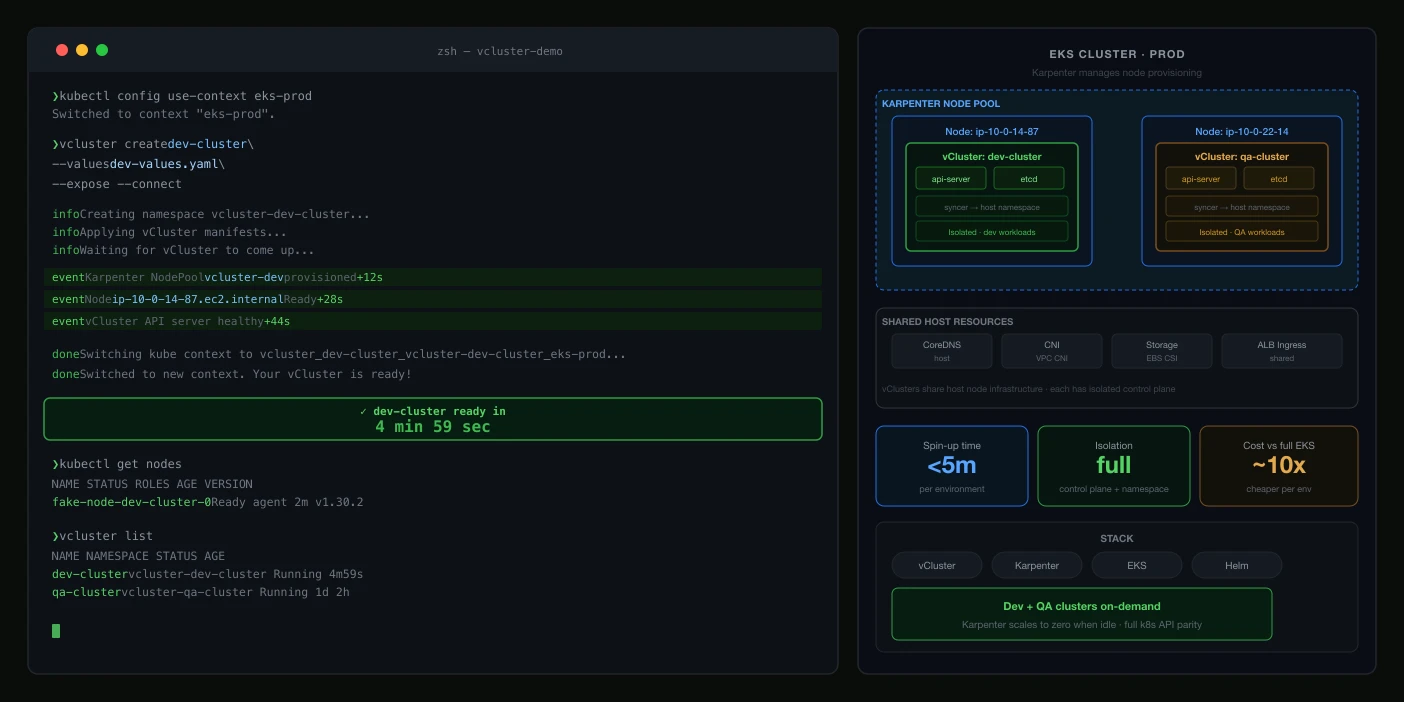
Running dedicated Amazon EKS clusters for every developer or QA engineer is slow (30–45 minutes per cluster), expensive, and operationally heavy. This post shows how combining vCluster with a shared EKS host cluster and Karpenter for node autoscaling lets your teams spin up fully isolated environments in under 5 minutes, at up to 70% lower infrastructure cost.
The Problem: One Cluster Per Environment Doesn't Scale
Modern engineering teams rightly insist on environment isolation: dev, QA, staging, and production should never share the same cluster. But taking this to its logical extreme creates a painful reality:
| Pain Point | Impact |
|---|---|
| Provisioning a new EKS cluster takes 30–45 minutes | QA engineers sit idle; sprint velocity drops |
| Every cluster needs its own ALB, Route 53, monitoring agents | Infrastructure cost multiplies linearly with team count |
| Platform team is the sole gatekeeper | Bottleneck slows down every squad |
| IAM roles and RBAC configs multiply | Security and access management becomes unwieldy |
| Idle clusters run 24/7 even after tests finish | Wasted AWS spend every month |
Deloitte faced exactly these challenges. After adopting EKS + vCluster they achieved 89% faster provisioning and reclaimed 500+ engineering hours per year.
What Is vCluster?
vCluster is an open-source project from Loft Labs that creates virtual Kubernetes clusters running as pods inside a real host cluster. Think of it as Kubernetes-in-Kubernetes, but lightweight and fast. Creating one takes seconds and costs a few pods, not a new EKS control plane.
Each virtual cluster has:
- Its own kube-apiserver, controller manager, and CoreDNS
- Its own namespaces, RBAC, and resource quotas
- Complete isolation: teams can't see each other's workloads
- Syncing to the host cluster for actual scheduling, networking, and storage
Unlike plain namespaces (which share the same apiserver), vClusters are architecturally isolated. Unlike real clusters (which carry full control-plane cost), vClusters are just pods on the host.
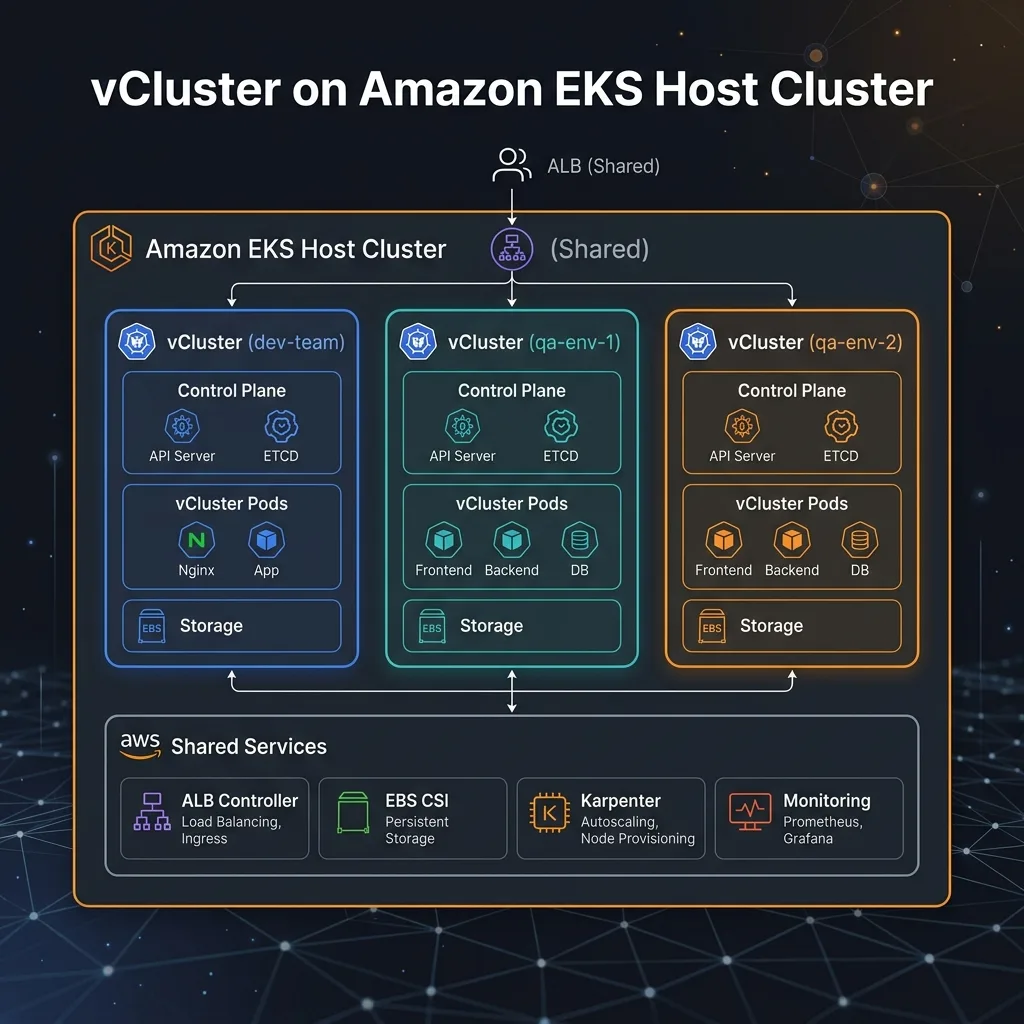
Architecture: Four Layers
1. EKS Host Cluster + Karpenter
One shared EKS cluster is the foundation. Karpenter replaces managed node groups: it watches for unschedulable pods and provisions right-sized EC2 nodes in ~60 seconds. When vClusters are idle, Karpenter's consolidation policy bins-packs workloads and terminates underused nodes, so ephemeral QA environments cost near-zero when not active.
2. Virtual Clusters (vCluster)
Each dev team or QA environment gets its own vCluster, provisioned in under 5 minutes via the vCluster web console, vcluster create CLI, or a Helm chart in an ArgoCD/Flux GitOps pipeline.
3. Shared Controllers (once on the host)
| Controller | Purpose |
|---|---|
| AWS Load Balancer Controller | Provisions ALBs for Ingress objects created inside vClusters |
| Karpenter | Autoscales EC2 nodes based on actual pod demand across all vClusters |
| EBS CSI Driver | Dynamically provisions gp3 EBS volumes for PVCs in vClusters |
| Monitoring Agent | Single Prometheus/Datadog agent covers all virtual clusters |
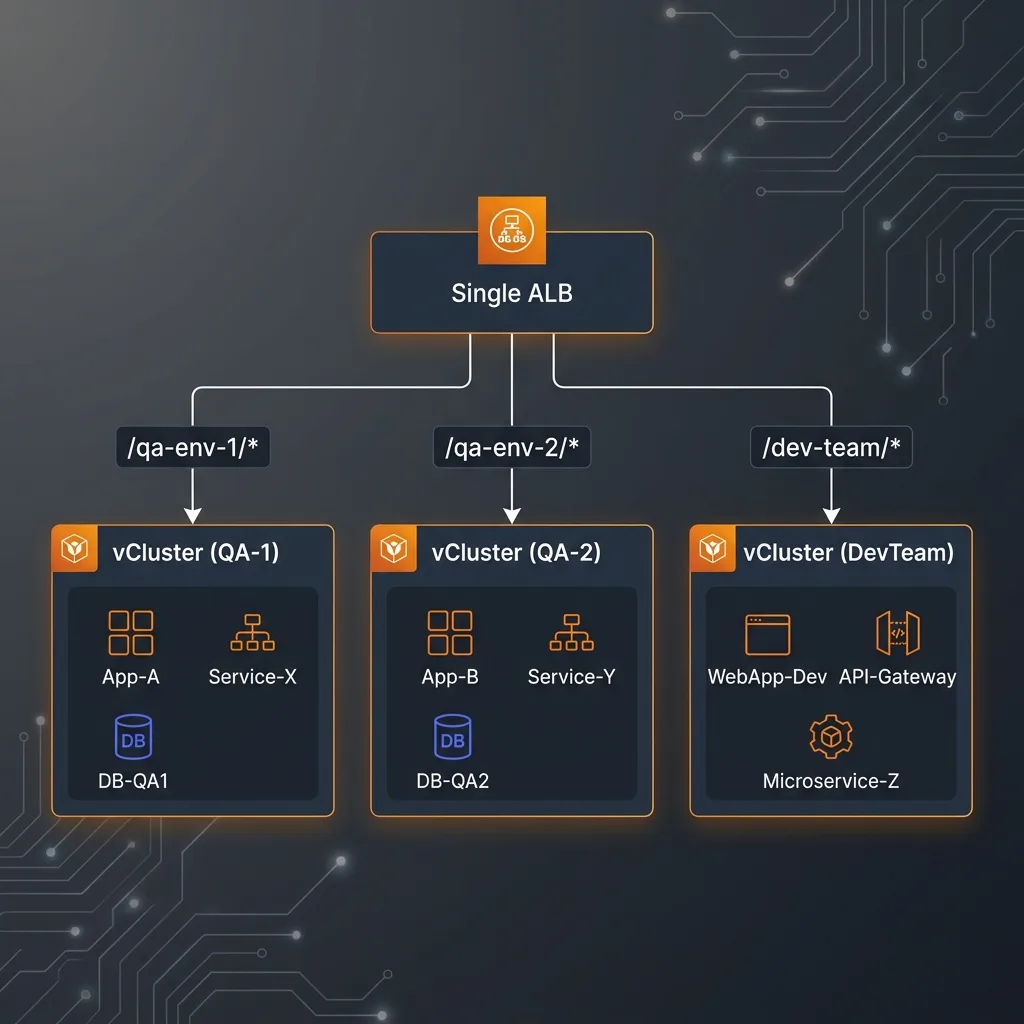
4. Single ALB with Path-Based Routing
One Application Load Balancer fronts all virtual clusters. Each app inside a vCluster creates an Ingress with a unique path prefix, and the ALB routes traffic using listener rules: no separate load balancer per env.
Step-by-Step Setup
Step 1: Install Karpenter
Start with a standard EKS cluster (no Auto Mode). Keep one managed node group for system/Karpenter workloads, then install Karpenter:
Then create a NodePool and EC2NodeClass:
Step 2: Configure Shared IngressClass and StorageClass
Step 3: Deploy vCluster Platform via Helm
Step 4: Create a Virtual Cluster
Log into the vCluster console and create a new virtual cluster with this sync configuration:
Why this sync config matters:
- fromHost: makes the shared ALB controller and EBS StorageClass transparently available inside the vCluster
- toHost: Ingress objects created by app teams inside the vCluster propagate to the host, triggering ALB path-rule creation automatically
Before vs After: The Developer Experience
❌ Before: Dedicated EKS Clusters
- 🕐 30–45 min wait for a new environment
- 👷 Platform team bottleneck on every request
- 💸 1 ALB + Route 53 + monitoring per environment
- 🔑 New IAM roles and RBAC per cluster
- 🖥️ Idle nodes running 24/7
✅ After: vCluster + Karpenter
- ⚡ Under 5 minutes, fully self-service
- 🚀 No platform team involvement
- 💰 1 shared ALB for all environments
- 🔐 vCluster RBAC: isolated without extra IAM
- 📉 Karpenter consolidates idle nodes automatically
Cost & Efficiency Impact
| Metric | Before | After | Gain |
|---|---|---|---|
| Provisioning time | 30–45 min | < 5 min | 89% faster |
| Platform team involvement | ~2 hrs/env | 0 hrs (self-service) | 500+ hrs/yr reclaimed |
| EKS control planes | 1 per environment | 1 shared | 90%+ reduction |
| Load balancers | 1 per environment | 1 shared ALB | Cost eliminated |
| EC2 cost (Karpenter + Spot) | On-demand only | Spot-first, auto-consolidated | Up to 70% cheaper |
GitOps: Tie vCluster Lifecycle to Pull Requests
Use ArgoCD to create and destroy vClusters automatically based on PR lifecycle:
PR opened → ArgoCD creates vCluster → App deployed → QA tests run. PR merged → ArgoCD prunes the Application → vCluster deleted → Karpenter consolidates idle nodes → cost drops to near-zero.
When to Use This Pattern
✅ Great fit
- Multiple dev/QA teams
- Ephemeral environments (PR-scoped)
- Platform team bottlenecks
- Cost-conscious AWS workloads
⚠️ Needs care
- Cluster-level CRD installs
- Very high I/O workloads
- Node-level compliance isolation
❌ Not ideal
- Production environments
- Shared GPU node pools
Conclusion
The combination of vCluster + EKS + Karpenter cuts provisioning time by 89% and infrastructure cost by up to 70%. With a single shared host cluster, you can support 100+ isolated virtual clusters, provision them in under 5 minutes, and let every dev and QA team operate independently, no platform team handoffs, no waiting, no wasted spend.
Karpenter handles the compute efficiency problem: Spot-first provisioning, ~60 second node startup, and automatic consolidation when environments go idle. vCluster handles the isolation problem: full Kubernetes API separation without the cost of real cluster control planes.
If your team is still waiting 45 minutes for a test environment, this is the architecture change worth making next sprint.
About Hardik Shah
Hardik builds EKS platforms where every team wants their own cluster and the bill says otherwise. vCluster plus Karpenter is the compromise he has had the most success with.