Why terraform init Downloads the Same Provider 40 Times — and How to Stop It

Hardik Shah
Cloud Architect & AWS Expert
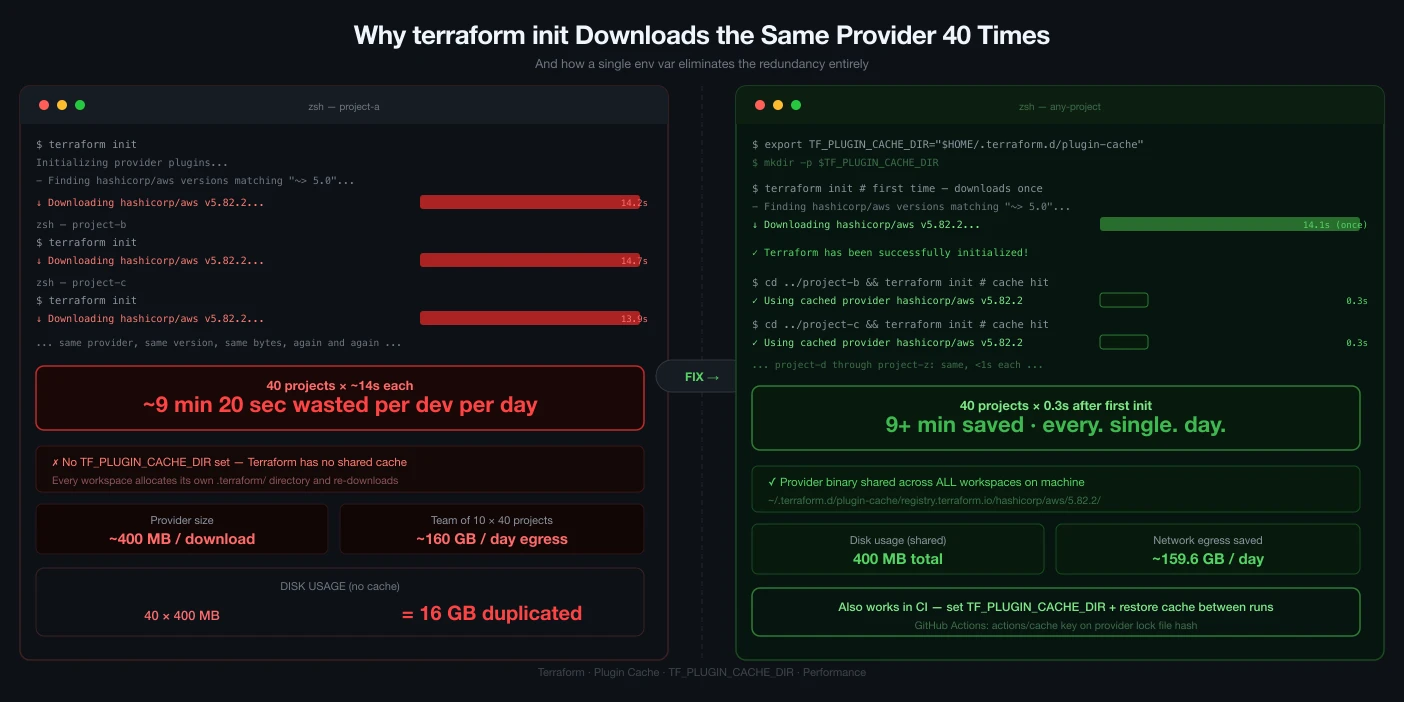
Open a fresh Terraform working directory, run terraform init, and watch it pull down the AWS provider. It's more than half a gigabyte. Now open the directory next door — a different environment, same provider — and run init again. Terraform downloads the whole thing a second time, into its own private .terraform folder. Do that across forty environments in a monorepo and you've downloaded the exact same bytes forty times and parked forty copies on your disk.
There's a one-line fix that's been in Terraform for years and that a surprising number of teams still don't use: the provider plugin cache. Point Terraform at a shared directory and every init checks there first. The bytes hit the network and the disk once; everything after that is a symlink. Here's how it works, what it actually saves, and the one sharp edge that trips people up in CI.
Every working directory installs from one shared cache instead of downloading its own copy.
What init is actually doing
The mental model most people carry — "init sets up my directory" — hides the expensive part. Under the hood, for every provider your configuration requires, init resolves a version, downloads a platform-specific package from the origin registry, verifies it, and unpacks it into .terraform/providers/ inside this working directory. That last word is the whole problem. The install is scoped to the directory, so nothing is shared. Ten directories that all use hashicorp/aws version 5.x means ten downloads and ten unpacked copies of the same binary.
On a laptop that's annoying. In CI, where each job starts from an empty checkout, it's a tax you pay on every single pipeline run — network time, registry rate limits, and the wall-clock minutes engineers spend watching a progress bar.
The fix is one environment variable
Tell Terraform where to keep a shared cache and it does the rest:
Prefer it permanent? Put it in the Terraform CLI config file instead of your shell profile — ~/.terraformrc on macOS and Linux, or %APPDATA%\terraform.rc on Windows:
If both are set, the TF_PLUGIN_CACHE_DIR environment variable wins. That's handy: a sane default in your config file, overridden per-job in CI.
Run the numbers on your own setup before you bother — for a single directory this saves nothing. The payoff scales with how many directories share providers:
Try it: your repo, your numbers
Drag the sliders. The gap on the right is what the plugin cache gives back.
No cache
25 GB
on disk
40 full downloads from the registry
Plugin cache on
650 MB
on disk — the rest are symlinks
1 download, then cache hits
That's 25 GB of disk and 39 redundant downloads gone — about 98%.
What happens on the next init
With the cache set, init changes its behavior for each required provider:
- Cache hit — the exact provider, version, and platform is already in the cache, so Terraform installs it into
.terraformas a symlink on any OS that supports them (macOS, Linux). No download, no second copy on disk. - Cache miss — Terraform downloads the package into the cache first, then installs from there. So even the very first directory populates the cache for everyone after it.
- No symlinks available (Windows, some filesystems) — Terraform copies from the cache instead of downloading. You still save the network round trip; you don't save the disk.
The cache is keyed on provider, version, and platform, so multiple versions and multiple OS/arch builds coexist happily. Upgrade one environment to a newer AWS provider and it downloads that one new version once — the older environments keep pointing at the version they pinned.
Why it's worth the two minutes
| You get | Because |
|---|---|
| Faster init | A cache hit is a local symlink, not an HTTPS download and unpack. Second-and-later inits go from seconds-to-minutes down to near-instant. |
| Less disk | One real copy per version instead of one per working directory. On a monorepo that's the difference between gigabytes and megabytes. |
| Less bandwidth | Each provider version is pulled from the registry once per machine, not once per directory. Kinder to your network and to the public registry. |
| Fewer registry failures | A warm cache means most inits never call the registry, so a registry hiccup or rate limit doesn't block your pipeline. |
The real payoff is CI
On a laptop the cache warms itself over a week of normal work. In CI, every job is a cold start — which is exactly where a persisted cache pays for itself. Set the variable, point it at a path your CI can cache between runs, and key that cache on your lock file so it refreshes when you bump a provider:
First run seeds the cache. Every run after that restores it and skips the downloads entirely, until someone changes a version in the lock file. That's usually the single biggest, cheapest win available on a Terraform pipeline.
The gotcha nobody warns you about
Here's the one that generates confused Slack messages. When Terraform installs from the cache, it's installing from an already-unpacked directory, not the signed archive it would normally pull from the registry. That means it can only record the checksum for your current platform in .terraform.lock.hcl — it can't compute the registry hashes for the other platforms your team runs on.
So a lock file generated with the cache on a Mac may not contain a hash that matches when a colleague on Linux — or your Linux CI runner — runs init, and their init fails a checksum check. The clean fix is to populate every platform's hash explicitly and commit the result:
If you'd rather just silence the warning and accept the older, laxer behavior, set this in your CLI config:
A couple more things to know. The cache isn't safe to share across parallel inits. HashiCorp says so plainly. If your CI fans out ten plan jobs that all populate the same cold cache at once, they can race and leave a half-written binary behind. Warm the cache in one step first, or give each parallel job its own cache path.
Terraform also never prunes it. The cache grows forever, one more copy every time you bump a provider, until you clean it out yourself:
And because the installs are symlinks, wiping that directory breaks every working directory that pointed into it. Re-run init to heal them.
Prove it actually kicked in
Don't take the setup on faith. You can see the symlinks. After an init that hit the cache, list the installed provider and look at where it points:
On a cache hit the binary is a symlink whose target is your plugin-cache directory, not a real file sitting inside .terraform. That arrow is the whole point: the working directory is borrowing one shared copy. The cache itself mirrors the registry's own layout, keyed by source, namespace, provider, version, and platform:
Cache or mirror — which one?
The plugin cache is a convenience layer. It still talks to the origin registry to discover versions and to fetch anything it doesn't already have. If your goal is a fully offline or air-gapped setup, you want a provider mirror instead — an authoritative local copy that Terraform treats as the source of truth:
Point Terraform at that mirror with a provider_installation block and it never reaches the public registry at all. Rule of thumb: reach for the cache to make a connected workflow faster, and a mirror when you need to run with no registry access at all. They're not mutually exclusive — plenty of teams mirror in locked-down environments and cache everywhere else.
Do it right now
This is a two-minute change with no downside for the single-directory case and a large upside the moment you have more than a couple. Set it up, then run init in two directories back to back and watch the second one finish before you've finished reading the output of the first:
Then wire the same variable into CI, key the cache on your lock file, and reclaim those minutes on every pipeline run for the rest of the project's life.
About Hardik Shah
Hardik works in Terraform repositories large enough that provider downloads show up on the CI bill. Most of his writing on Terraform comes from irritation with a loop he ran too many times.