Send Alertmanager Email Through SES With an IAM Role, No SMTP Passwords

Hardik Shah
Cloud Architect & AWS Expert
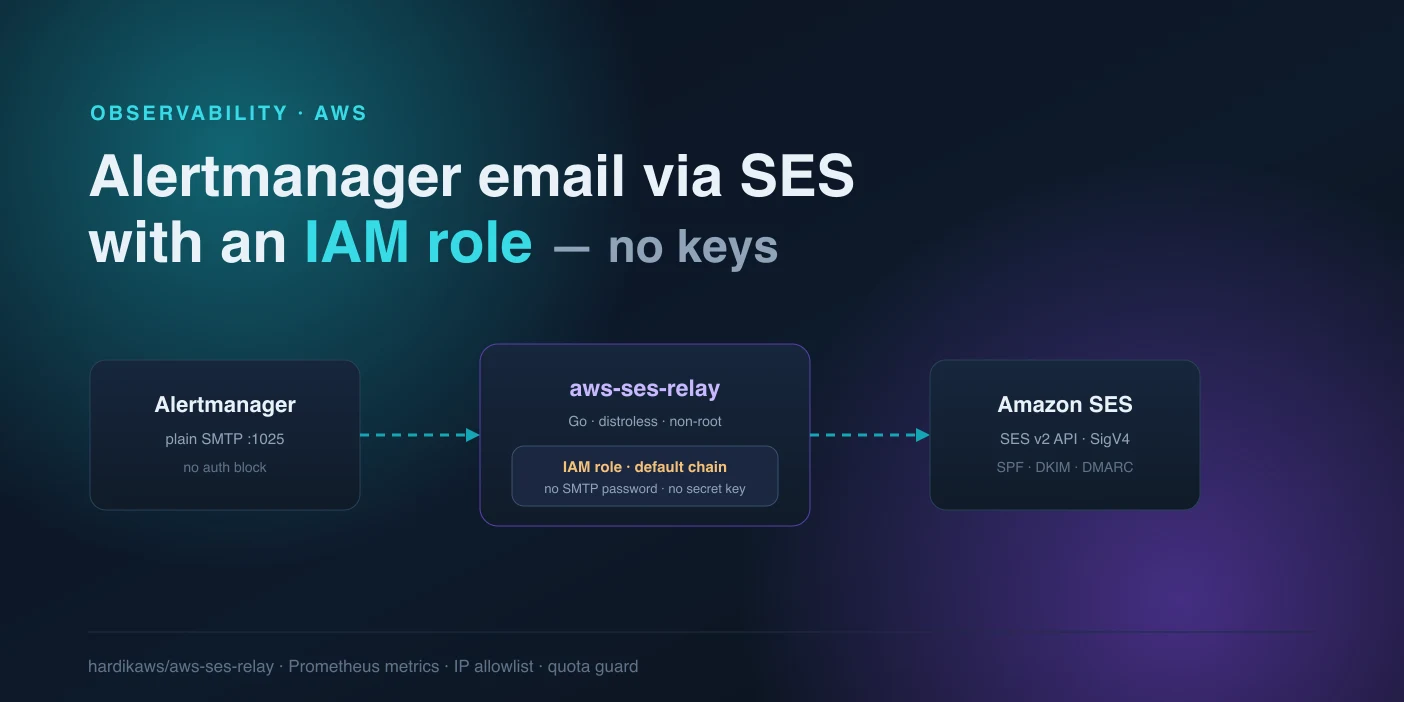
Alertmanager can email your alerts, and Amazon SES is the cheapest way to send those emails. The two do not connect cleanly. SES exposes an SMTP endpoint, but it wants a username and password, and those SES SMTP credentials are a long-lived secret derived from an IAM user's access key. So the standard setup is: mint an IAM user, generate SMTP credentials, and paste them into your Alertmanager config. A static password, sitting in a file, that someone has to rotate.
If your Prometheus stack runs on EC2, ECS, or EKS, it already has an IAM role attached. That role can call SES directly. There is no reason to also carry a separate SMTP password. This post wires Alertmanager to SES so that the role does the authenticating and nothing static ends up in your config. The bridge is a small Go proxy, aws-ses-relay.
Why the SES SMTP Path Hurts
SES gives you two ways to send: the SMTP interface and the SES v2 API. Alertmanager only speaks SMTP, so most guides reach for the SMTP interface. That path needs SES SMTP credentials, which are not the same as your AWS access keys. You create an IAM user, and SES converts that user's secret access key into an SMTP username and password through a signing derivation. The result is a credential that:
- never expires on its own, so it lives until someone remembers to rotate it
- has to be stored somewhere Alertmanager can read it, in plaintext or a mounted file
- belongs to an IAM user, which is exactly the kind of long-lived identity most AWS security baselines tell you to avoid
In an Alertmanager config it looks like this, and the password is the part that keeps you up at night:
You can move that password into smtp_auth_password_file and mount it from a secret store, which is better, but you still own a static secret and its rotation. The role on the box is unused.
The Bridge: Plain SMTP In, IAM-Role SES Out
aws-ses-relay is a Go service that accepts plain SMTP on port 1025 with no client authentication, then forwards each message through the SES v2 API. For the SES call it uses the AWS default credential chain, so it picks up whatever role is already on the host: an EC2 instance profile, an ECS task role, or an EKS IRSA / Pod Identity role. No SMTP password. No AWS access key. Nothing static.
Alertmanager talks to the relay over the loopback or the local network, so leaving that hop unauthenticated is fine as long as the relay is not exposed beyond your own subnet. The relay ships as a distroless, non-root image (uid 65532) and is multi-arch, so it runs as a sidecar next to Alertmanager or as a small standalone service.
Step 1: The IAM Policy
The role needs exactly two SES actions. ses:SendEmail to send, and ses:GetAccount so the relay can read your 24-hour send quota and back off before it hits the cap. Scope the send permission to your own domain with a ses:FromAddress condition, so a misconfigured sender cannot send as anyone else:
Attach this to the instance profile, ECS task role, or EKS role that the relay runs under. This is the only place identity is granted. There is no IAM user and no key to hand out.
Step 2: Run the Relay
The relay reads its config from flags or SES_RELAY_* environment variables. On an EC2 host with Docker, this pulls the image and starts it on the SES Region, with an allowlist so only your Alertmanager container can connect:
No credentials are passed. Because the container inherits the host's instance-profile role through the default credential chain, the SES call is signed with SigV4 using temporary role credentials that AWS rotates for you. On ECS, run this as a second container in the same task definition so Alertmanager can reach it at localhost:1025, and give the task role the policy above.
The admin port 9090 serves /healthz, /readyz, and /metrics, so an orchestrator can gate traffic on readiness and Prometheus can scrape the relay itself.
Step 3: Point Alertmanager at the Relay
Now the Alertmanager config loses its secret. The smarthost is the relay, the from address is a verified SES identity, and there is no smtp_auth_* block at all. Set smtp_require_tls: false because the hop to the relay is a trusted local link; the relay is the one that speaks TLS to SES:
Fire a test alert, or send one by hand with amtool, and the message flows Alertmanager → relay → SES → inbox. Deliverability still depends on the SES side: verify the domain and turn on SPF, DKIM, and DMARC on that identity. The relay changes how you authenticate to SES, not how mailbox providers judge your mail.
What the Relay Guards Against
An open SMTP-to-SES pipe is a way to burn your sending reputation and your quota. The relay applies a few checks at accept time, before it ever calls SES:
- IP / CIDR allowlist: only hosts you list can submit mail
- Sender and recipient filters: regex rules reject a message whose from or to address does not match, before it costs you a send
- Per-IP rate limiting: a token bucket per source IP absorbs an alert storm instead of hammering SES
- Send-quota guard: the relay polls
ses:GetAccountand backs off as you approach the 24-hour cap, so a runaway alert loop does not blow your daily limit
It also handles the operational edges: CRLF-safe SMTP replies, and a graceful SIGTERM so in-flight messages finish during a rolling deploy.
Watching It Work
The relay is a Prometheus target in its own right. The counter that matters is ses_relay_messages_total, labeled by result, so you can see at a glance whether messages are landing or getting rejected:
Alongside it you get ses_relay_recipients_total, ses_relay_send_duration_seconds, and ses_relay_message_bytes. A rising denied or quota_blocked line is your early warning that a receiver is misconfigured or an alert is flapping, and you can alert on the thing that sends your alerts.
The Payoff
The Alertmanager config no longer holds a password. The IAM user is gone. The only identity in play is the role your instance or task already runs under, and AWS rotates its credentials on a schedule you never touch. If the box is compromised, an attacker gets a scoped, temporary credential that can only send from your domain, not a permanent SMTP secret they can lift and reuse from anywhere.
This is the same pattern that works for any app that can only speak SMTP: cron jobs, legacy services, off-the-shelf tools. Put the relay in front, hand it a role, and delete the static credentials.
About Hardik Shah
Hardik runs Alertmanager on EKS clusters where every static SMTP password is one more secret somebody has to rotate at 2am. He has replaced that setup with IAM roles on enough clusters to know which parts of the SES side people get wrong first.