AWS Interconnect is Now GA: Multicloud & Last-Mile Private Connectivity Done Right

Hardik Shah
Cloud Architect & AWS Expert
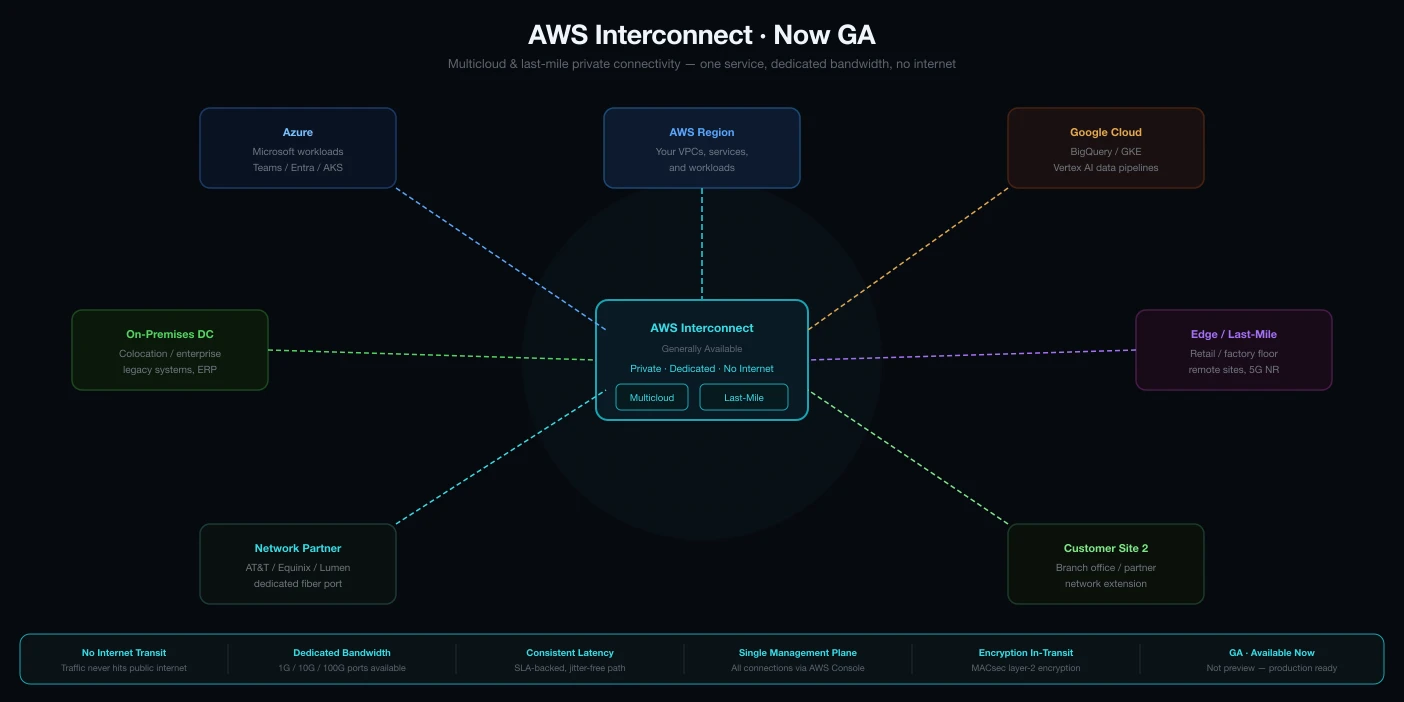
If you've ever spent a week wiring up VPN tunnels, fighting BGP route tables, or coordinating with colocation providers just to move traffic between AWS and another cloud, you'll understand exactly why AWS Interconnect matters. It went generally available on May 17, 2026, and it quietly eliminates an entire category of undifferentiated networking work that networking teams have been stuck doing for years.
AWS Interconnect isn't a single product. It's two distinct managed connectivity services that share the same underlying architecture: AWS Interconnect – multicloud for private Layer 3 connections between AWS and other cloud providers, and AWS Interconnect – last mile for extending private, redundant connectivity from branch offices and on-premises data centers through participating network providers. Both are built on top of AWS Direct Connect infrastructure, but the operational model is fundamentally different from anything Direct Connect offered before.
The Problem It Actually Solves
Multicloud isn't a design choice anymore. For most enterprises it's just the reality of how acquisitions, regulatory requirements, and vendor lock-in avoidance play out. What that reality produces operationally is a mess: VPN overlays that cap out at 1.25 Gbps per tunnel, colocation facilities where you're managing physical cross-connects, BGP configurations across three different cloud consoles, and a networking team that spends 60% of its time doing connectivity plumbing instead of anything close to application delivery.
AWS's answer to this is to treat multicloud connectivity as a managed service, the same way they treated compute, storage, and databases. You define what you want. AWS provisions it. You don't touch the physical layer.
AWS Interconnect architecture: private Layer 3 connectivity between AWS and partner clouds over AWS's global backbone.
AWS Interconnect – Multicloud: What You're Actually Getting
The multicloud variant creates a private Layer 3 connection between your AWS VPC and a VPC in another cloud. Traffic flows over the AWS global backbone and the partner cloud's private network. It never touches the public internet. This gives you predictable latency, consistent throughput, and the ability to enforce network-level controls without managing physical hardware.
Supported Cloud Providers at GA
- Google Cloud: available now across five region pairs (us-east-1 ↔ N. Virginia, us-west-1 ↔ Los Angeles, us-west-2 ↔ Oregon, eu-west-2 ↔ London, eu-central-1 ↔ Frankfurt)
- Microsoft Azure: coming later in 2026
- Oracle Cloud Infrastructure: coming later in 2026
Key Technical Properties
- IEEE 802.1AE MACsec encryption on all physical links between routers (encryption at the link layer, not just in transit)
- Built-in redundancy: multiple logical links spread across at least two physical facilities, configured automatically
- Automatic route propagation in both directions, no manual BGP route injection
- Amazon CloudWatch Network Synthetic Monitor included with every connection, active monitoring out of the box
- Integrates directly with Direct Connect Gateway, Virtual Private Gateway, AWS Transit Gateway, and AWS Cloud WAN
Architecture Note
IP address ranges on both sides of an Interconnect connection cannot overlap. AWS defaults to 172.31.0.0/16 and GCP defaults to 10.156.0.0/20. Those are compatible. But if you're using custom CIDR ranges, validate non-overlap before provisioning. Also: MTU must be identical on both sides. AWS and GCP have different defaults. Mismatched MTU causes silent packet drops under load (one of those issues that's infuriating to diagnose).
Provisioning: How It Works End to End (AWS ↔ Google Cloud)
The provisioning flow splits across both cloud consoles, but it's far simpler than the traditional Direct Connect + Cloud Interconnect manual pairing process. Here's the sequence:
Step 1: Request on the AWS Side
In the AWS Direct Connect console, navigate to AWS Interconnect and select Create. You'll choose:
- Cloud provider (Google Cloud, in this example)
- AWS Region and the corresponding partner region
- Bandwidth tier
- Direct Connect Gateway to attach to
- Google Cloud project ID
AWS generates an activation key that you'll use on the Google Cloud side to complete the pairing.
Step 2: Complete on the Google Cloud Side
Using the activation key from AWS, you create a transport via the GCP CLI or console. Then you configure VPC peering between your GCP VPC and the transport network, enabling custom route import and export so traffic can flow across the interconnect.
Step 3: Associate the Gateway
Back on the AWS side, associate the interconnect with a Virtual Private Gateway in the same region, then add a route table entry in your VPC pointing the GCP IP range at that VGW. Once both sides confirm active status, instances on either cloud can reach each other via private IP, with no public internet involved.
IPv6 + MTU Checklist
- › You can configure IPv4, IPv6, or both, but the choice must match on both sides of the connection
- › Verify MTU settings on both VPCs before provisioning. AWS and GCP default to different values
- › Test with large packets immediately after connection comes up to catch MTU mismatch before production traffic hits it
Scaling with Transit Gateway and Cloud WAN
A single VPC use case is straightforward. But real enterprise architectures involve dozens of VPCs, multiple regions, and often multiple cloud environments running simultaneously. AWS Interconnect integrates cleanly with both Transit Gateway and Cloud WAN to handle this.
AWS Transit Gateway Pattern
Attach the Interconnect to a Transit Gateway instead of a Virtual Private Gateway, and you get a centralized routing hub for all VPCs in a region. Traffic segmentation via route tables lets you control which VPCs can reach the interconnect, useful when you want to permit cross-cloud traffic from production VPCs only, blocking dev and staging from the private link entirely. You can also inline AWS Network Firewall to inspect all traffic crossing the interconnect boundary.
AWS Cloud WAN Pattern
Cloud WAN extends the model globally. Any AWS region in your core network can reach any Interconnect attachment through the global backbone, without configuring explicit peering between regions. If you're running active workloads in Frankfurt and Oregon simultaneously, both can reach the same Google Cloud environment through their regional Interconnect connections, with centralized policy management in Cloud WAN.
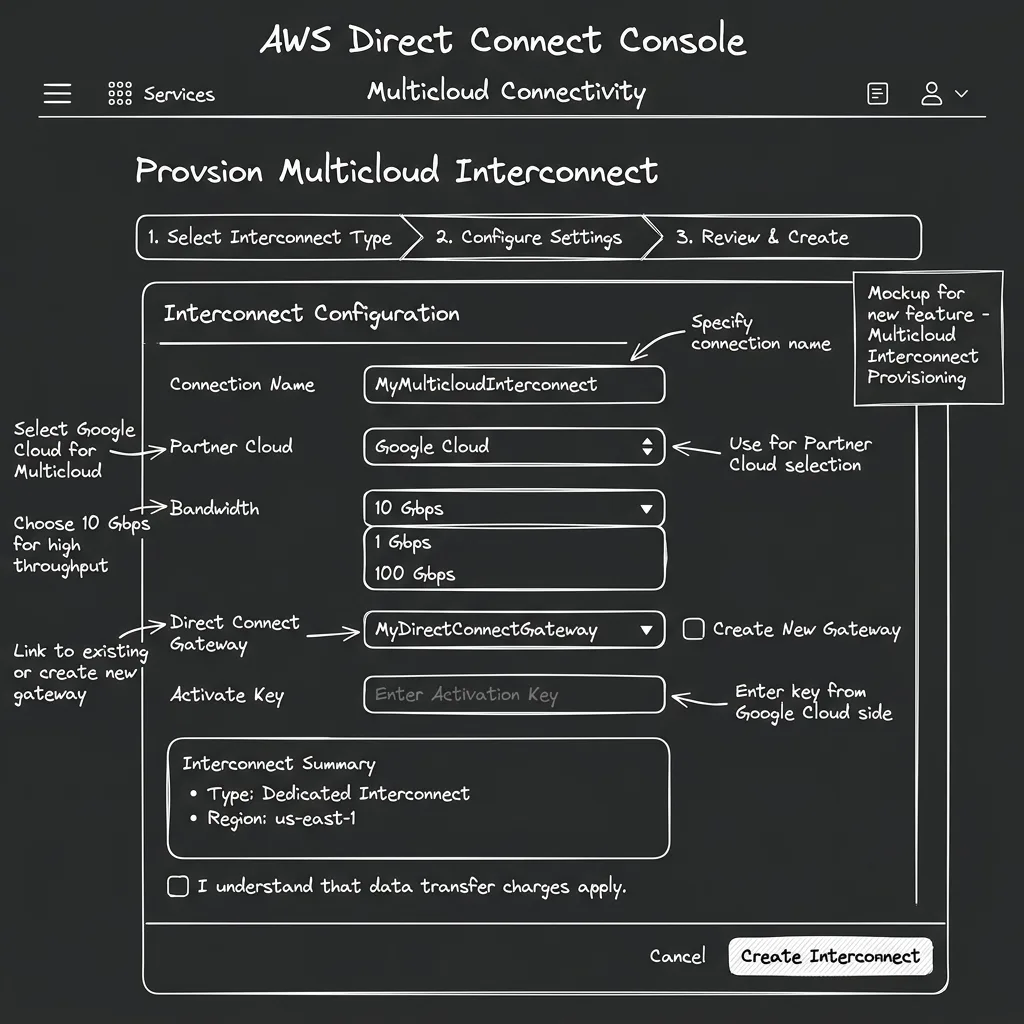
AWS Direct Connect console showing the Interconnect provisioning interface for multicloud connections.
AWS Interconnect – Last Mile: Simplified Branch Connectivity
The last-mile variant solves a different problem: getting remote offices, retail locations, and on-premises data centers connected to AWS privately without negotiating colocation contracts or managing physical cross-connects yourself.
You pick a participating network provider (Lumen Technologies at GA launch, with AT&T and Megaport in progress). AWS and the provider automatically provision four redundant connections across two physical locations. BGP routing is configured automatically. MACsec encryption and Jumbo Frames are enabled by default. You don't touch the physical infrastructure.
Technical Specifications
- Bandwidth: 1 Gbps to 100 Gbps, adjustable from the console without reprovisioning the connection
- Availability SLA: 99.99% up to the Direct Connect port
- Redundancy: Four connections across two physical facilities, automatic, not optional
- Routing: BGP configured automatically, no manual peering configuration
- Monitoring: CloudWatch Network Synthetic Monitor included, same as multicloud variant
- Integration: Attaches to Direct Connect Gateway, then connects to VGW, Transit Gateway, or Cloud WAN
Pricing Model
Both variants use a flat hourly rate based on the requested capacity. Billing is prorated by hour. Pricing varies by region pair and bandwidth tier. The rates for a 1 Gbps connection between us-east-1 and Google Cloud N. Virginia will differ from a 10 Gbps connection between eu-central-1 and Google Cloud Frankfurt.
AWS publishes full rate cards on the AWS Interconnect pricing pages. Review those before sizing connections. The flat-rate model means you're paying for provisioned capacity whether or not you're using it. Right-size based on your 95th percentile traffic, not your theoretical peak.
Who Should Use This
AWS Interconnect is built for teams that need predictable, low-latency, private connectivity at scale, not teams doing occasional data transfers. Here's where it makes sense:
- Active-active multicloud architectures where latency between clouds is a hard requirement (financial services running risk calculations split across AWS and GCP, for example)
- Data sovereignty and compliance scenarios where traffic cannot traverse the public internet regardless of encryption status
- Large-scale data migrations between cloud environments where VPN throughput caps are a bottleneck
- Enterprise branch connectivity where the last-mile variant eliminates the colo relationship and the physical hardware management entirely
- Disaster recovery across clouds where replication latency matters and public internet isn't acceptable for replication traffic
If you're making occasional cross-cloud API calls or running small batch transfers, VPN or even public internet with TLS is probably still the right answer. Interconnect is priced and designed for sustained, high-bandwidth, latency-sensitive workloads.
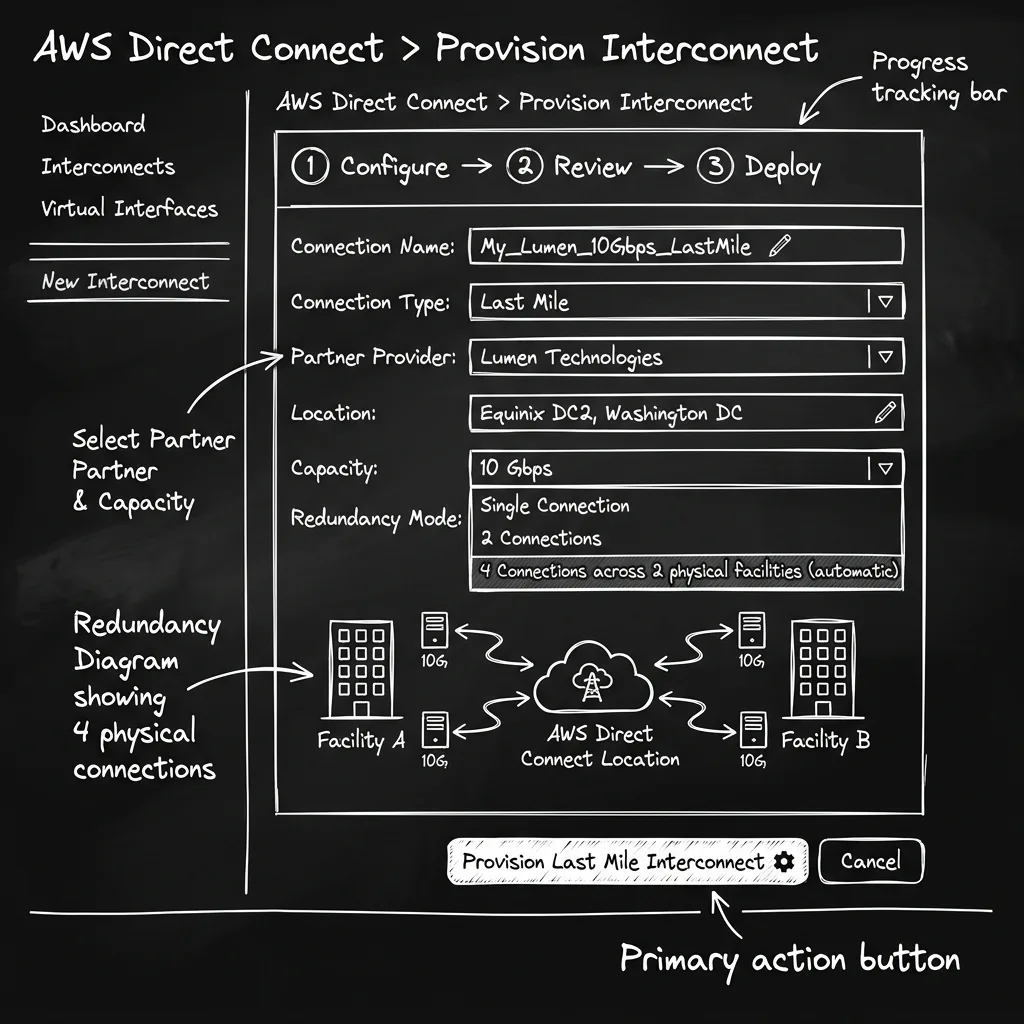
AWS Interconnect – last mile provisioning: automatic four-connection redundancy across two physical facilities.
What This Means for the Industry
AWS publishing the Interconnect specification on GitHub under Apache 2.0 is the detail that matters long-term. This is AWS signaling that they want Interconnect to become an industry standard for cloud-to-cloud connectivity, not a proprietary lock-in play. If Azure and Oracle both support it by end of 2026 as planned, the toolchain for managing multicloud connectivity becomes dramatically simpler.
The Direct Connect team has spent years making private connectivity reliable. AWS Interconnect is what happens when you take that reliability and apply it to the problem of connectivity between clouds rather than just from customer premises to AWS. It's not solving a new problem. Multicloud connectivity has existed via VPN, colo, and Direct Connect workarounds for years. It's solving it in a way that doesn't require a networking engineer to spend two weeks on it.
How to Get Started
- Open the AWS Direct Connect console and select AWS Interconnect from the left navigation.
- Choose your variant: multicloud for cloud-to-cloud, last mile for branch/DC connectivity.
- Select your region pair and bandwidth. Review the pricing page before committing to a tier.
- Verify IP address ranges and MTU on both sides before provisioning. These are the two most common configuration errors.
- Attach to Direct Connect Gateway and associate with your VGW, Transit Gateway, or Cloud WAN depending on your topology.
- Enable CloudWatch Network Synthetic Monitor: it's included, so use it. Set up latency and packet-loss alarms from day one.
The "undifferentiated heavy lifting" of multicloud networking just got a lot lighter. If you've been putting off a multicloud architecture because the connectivity model was too painful to operate, that excuse is gone. AWS Interconnect is live, and it's available today in the AWS Direct Connect console.
About Hardik Shah
Hardik spends a fair amount of his time on the boring parts of cloud networking: Direct Connect, Transit Gateway, and whichever hybrid link the client already signed a contract for. Multicloud connectivity is a recurring conversation in that work.