Cross-Account, Cross-Region Replication for ECR and S3, Including the Data You Already Have

Hardik Shah
Cloud Architect & AWS Expert
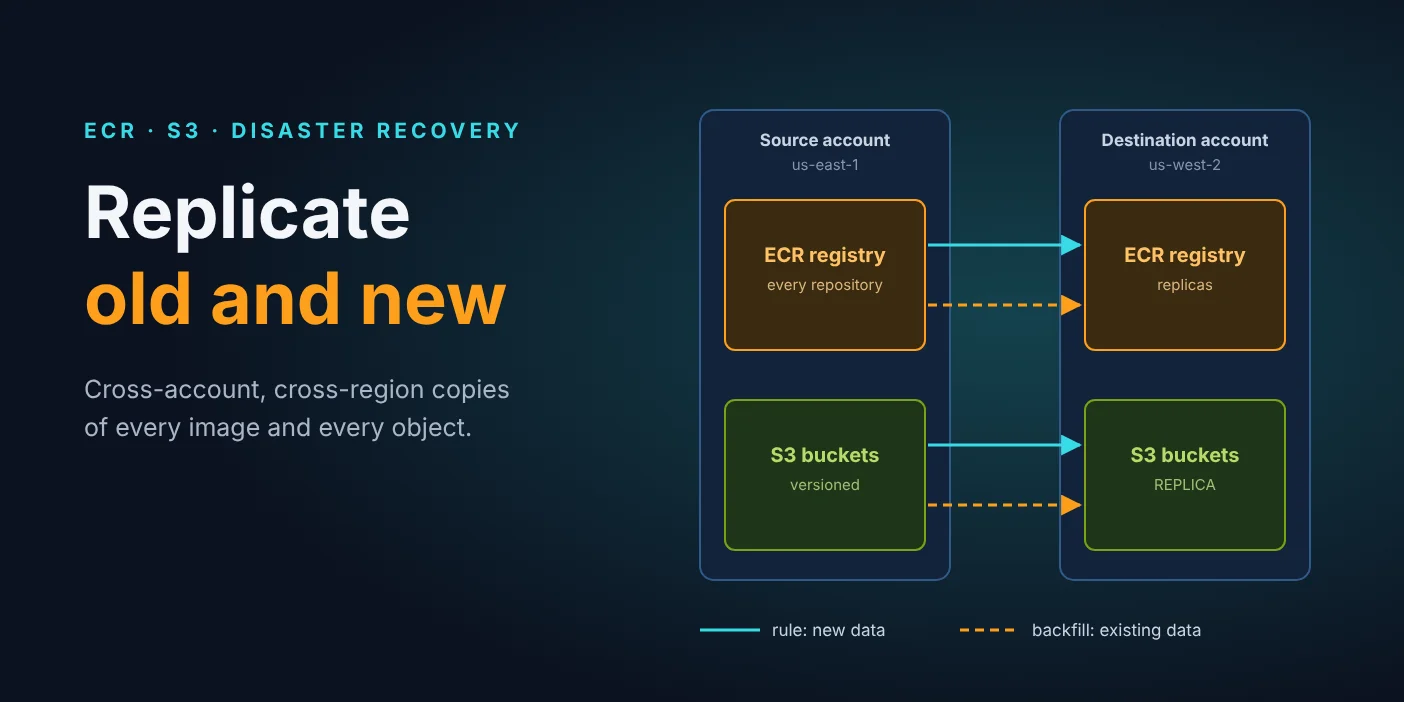
A disaster-recovery copy in a second AWS account and region sounds like a checkbox: turn on replication and move on. Then someone opens the destination bucket and finds it empty. ECR replication and S3 replication only copy data written after the rule exists. This post sets up both rules and the one-time backfill that copies everything already there.
Why doesn't replication copy existing data?
Both services treat replication as a reaction to a write. ECR copies an image when it is pushed, and S3 copies an object when it is put. Nothing is pushed or put again when you create the rule, so every image and object from before that moment stays in the source until you copy it yourself.
That splits the work into two jobs for each service:
- New data: a native replication rule for ECR and one for each S3 bucket.
- Existing data: a one-time backfill, with
cranefor container images and S3 Batch Replication for objects.
The setup
| Side | Account | Region | AWS CLI profile |
|---|---|---|---|
| Source | 111111111111 | us-east-1 | src |
| Destination | 222222222222 | us-west-2 | dst |
The goals are to replicate every ECR repository and image, and to replicate a set of S3 buckets (16 in our case) to matching buckets in the destination. Existing objects and their older versions count too. Every command below names its profile and region explicitly, so nothing depends on whatever your shell happens to default to.
Part 1: ECR
Step 1: Let the source replicate into the destination
In the destination account, add a registry policy that trusts the source account to create repositories and replicate images. Save it as dest-registry-policy.json:
Replication creates any missing destination repository with default settings: AES256 encryption, mutable tags and no lifecycle policy. If you want something else, create a repository creation template before you turn replication on. This one makes every replicated repository use immutable tags:
Step 2: Create the replication rule in the source
Save the rule as replication-config.json and apply it in the source region:
With no repositoryFilters, the rule covers every repository. ECR creates the AWSServiceRoleForECRReplication service-linked role on first use, so whoever runs this needs iam:CreateServiceLinkedRole. From here on, every push in us-east-1 is copied to the destination.
Step 3: Backfill the images that already exist
For the images pushed before the rule, I use crane. It copies manifests and layers straight from one registry to the other without pulling to local disk, and it keeps multi-arch images and their digests intact. A docker pull and docker push loop only handles your own machine's platform, so an arm64 variant would quietly go missing.
Install it on x86_64 (use the Linux_arm64 tarball on Graviton):
Build hosts in private subnets often have no route to GitHub. If that is yours, download the tarball somewhere else and copy it over with scp.
Then save this as backfill-ecr.sh. It logs crane in to both registries, creates any destination repository that does not exist yet, and copies every tagged image:
Run it with bash, not sh. On many distributions sh is dash, and set -o pipefail fails there before the script copies anything. The script only copies tagged images. Untagged manifests are usually build leftovers, and a repository creation template or lifecycle policy in the destination is the place to decide what to keep.
Step 4: Verify ECR
You want "status": "COMPLETE" for the destination. Then push a new test tag to any repository and confirm it shows up in us-west-2 within a minute or two. That proves the rule; the backfill log proves the history.
Part 2: S3
S3 has more moving parts than ECR:
| Piece | Lives in | Purpose |
|---|---|---|
| Replication IAM role | Source | S3 assumes it to read source objects and write replicas |
| Destination bucket policy | Destination | Lets that role write into the bucket |
| Versioning | Both | Required on both sides before replication will run |
| Replication rule | Source bucket | Copies new objects |
| Batch Operations role and job | Source | Copies existing objects |
With 16 buckets, clicking through the console is how one bucket ends up with versioning off and nobody notices for a month. I scripted it instead, with every setting in one config file. Why the copy belongs in a separate account and region at all is covered in S3 cross-account, cross-region replication for a DR site.
The scripts need jq (dnf install -y jq or apt install -y jq).
Step 1: Create the IAM roles in the source
The replication role is trusted by s3.amazonaws.com. It reads from the source bucket and writes replicas into the destination:
The Batch Operations role is trusted by batchoperations.s3.amazonaws.com:
In the script, the resource lists are generated from BUCKET_PAIRS, so one role of each kind covers every bucket.
Order matters here. The destination bucket policy in the next step names the replication role as its principal. If the role does not exist yet, put-bucket-policy fails with Invalid principal. Create the roles first.
Step 2: Turn on versioning and extend the policy in the destination
For each destination bucket, turn on versioning:
Then add these two statements to its bucket policy. Add, not replace: the bucket may already carry statements someone depends on.
put-bucket-policy replaces the whole policy in one call. So the script reads the existing policy, backs it up to a file, merges the two statements in with jq and writes the result back:
Filtering on Sid makes the step safe to re-run. The two statements are replaced each time instead of piling up as duplicates, and the backup file is what you restore from if you roll back.
Step 3: Add the replication rule for new objects in the source
Turn on versioning on each source bucket:
Then write the rule as replication.json:
Three choices in that rule are worth explaining:
AccessControlTranslationset toDestinationmakes the destination account the owner of the replicas. Without it, the source account owns objects sitting in someone else's bucket, and the destination team cannot manage them cleanly.DeleteMarkerReplicationset toDisabledmeans a delete in the source does not hide the object in the destination. For a recovery copy that is usually what you want. An accidental or malicious delete should not take out both copies.put-bucket-replicationoverwrites any replication configuration already on the bucket. The script skips buckets that already have one unless you setFORCE=1, and it also skips buckets with SSE-KMS default encryption, which need the extra settings covered below.
Step 4: Copy existing objects with S3 Batch Replication
This is the S3 version of the crane backfill, except you do not write the copy loop. Batch Replication builds its own manifest of every object that has never been replicated, then replicates each one through the rule you just created. All versions, metadata and tags come across, and the copies are marked REPLICA exactly like newly written objects.
The ObjectReplicationStatuses filter does the real work. NONE picks up everything that predates the rule, and FAILED retries anything that failed before. That makes the job safe to run again later: objects already replicated are left alone.
The script loops over every bucket pair, starts one job per bucket and records the job IDs, so a second script can print a status table:
A job on an empty bucket can end in Failed because its manifest has nothing in it. That is harmless. If Batch Replication is not an option for you, aws s3 sync between the two buckets copies the current versions. It does not carry older versions or tags, though, and the copies are not marked as replicas.
Step 5: Verify S3
The counts will not match while a batch job is still running. Compare them once every job in the status table reads Complete.
What about SSE-KMS buckets?
Replication skips objects encrypted with SSE-KMS unless you opt in, and it does so without an error. The rule has to select KMS-encrypted objects and name a destination key. The replication role needs decrypt on the source key and encrypt on the destination key, and the destination key policy must allow that role.
The rule change looks like this:
Buckets on SSE-S3 (AES256) need none of this, which is why the script handles them first and leaves KMS buckets for a deliberate second pass.
What does replication not copy?
Neither service copies data that existed before the rule, which is why the backfill exists. ECR also leaves repository settings and deletes behind. S3 leaves permanent deletes, lifecycle expirations and bucket settings behind, and skips KMS-encrypted objects unless configured. Plan for each of these explicitly instead of finding them during a recovery.
| Service | Not replicated | What to do |
|---|---|---|
| ECR | Images pushed before the rule | Backfill with crane |
| ECR | Lifecycle policies, repository policies, scan settings | Repository creation template, or set them per repository |
| ECR | Pull-through cache repositories | Configure pull-through cache rules in the destination too |
| ECR | Deletes in the source | Nothing; the destination keeps the image, which suits a recovery copy |
| S3 | Objects written before the rule | Batch Replication |
| S3 | Permanent deletes by version ID, lifecycle expirations | Give the destination its own lifecycle rules |
| S3 | Lifecycle rules, CORS, notifications, website configuration | Apply them to the destination bucket yourself |
| S3 | SSE-KMS objects | Opt in with SseKmsEncryptedObjects and key permissions |
Troubleshooting
| Symptom | Cause and fix |
|---|---|
| ECR replication status FAILED | Destination registry policy missing, or it names the wrong principal |
| crane: command not found, then BrokenPipeError | crane is not installed, so the AWS CLI was piping its password into nothing |
| syntax error near ( or pipefail errors | Script run with sh; run it with bash |
| S3 Invalid principal on the bucket policy | Replication role not created yet, or IAM is still propagating; wait and retry |
| S3 ReplicationStatus FAILED | Destination bucket policy missing, or destination versioning is off |
| KMS objects never arrive | Add SseKmsEncryptedObjects to the rule and grant the key permissions |
| Batch job AccessDenied | Batch role lacks s3:InitiateReplication, or the caller lacks iam:PassRole |
| Old data missing in the destination | Expected until you run the crane backfill or the batch job |
Rollback
S3 versioning can be suspended but never turned off again, and anything already replicated stays in the destination. Rolling back stops new copies; it does not undo old ones.
Wrapping up
Replication is really two jobs: a rule that copies everything from now on, and a one-time backfill for everything that already exists. For ECR the backfill is a short crane copy loop. For S3, Batch Replication with the NONE and FAILED filter does it natively, versions and all.
Run the steps in order: roles, then destination policy, then source rule, then backfill. Verify each side with a test write and a count. At the end you have a complete copy of your registry and buckets in a second account and region that you can prove is complete.
About Hardik Shah
Hardik has built disaster-recovery copies of container registries and S3 buckets across AWS accounts. He checks the destination with a count, not with the rule's status.