Why Move EKS Worker Nodes from AL2023 to Bottlerocket

Hardik Shah
Cloud Architect & AWS Expert
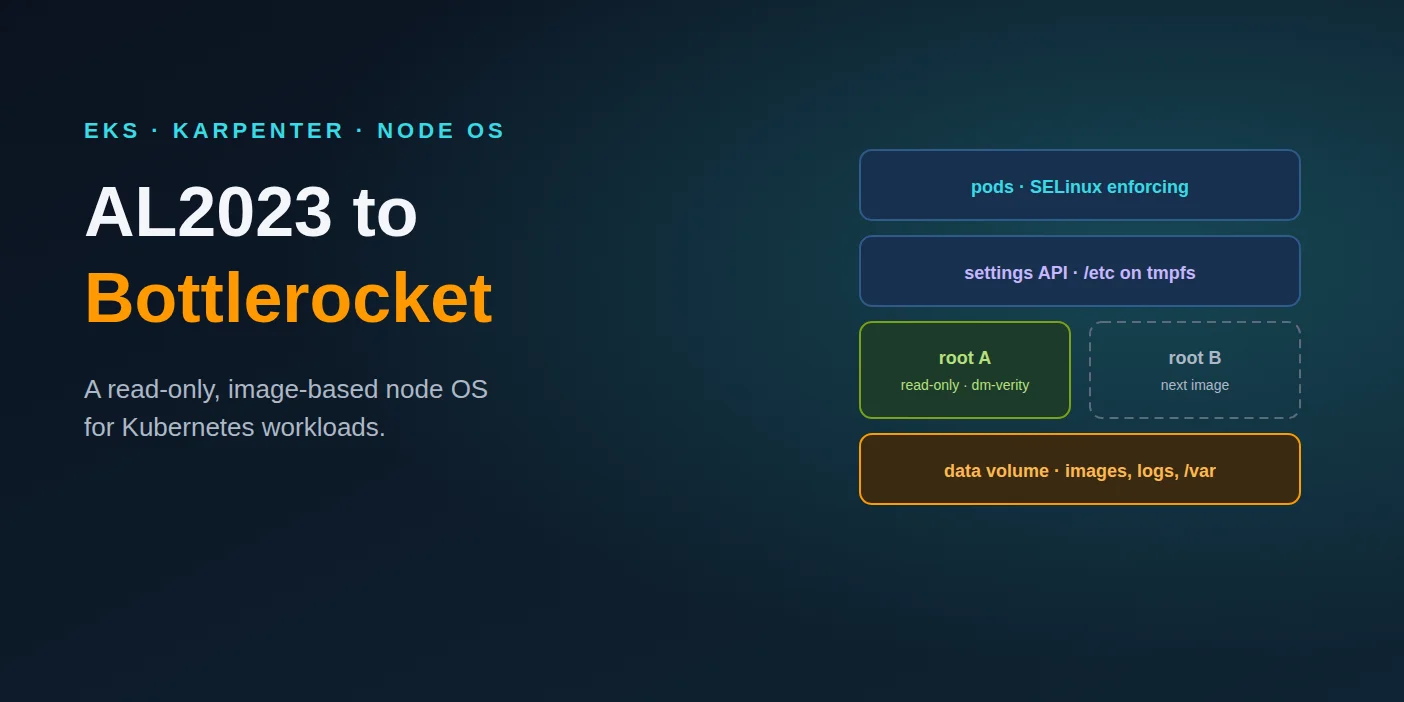
AL2023 is a perfectly good general-purpose Linux. That is the problem with it as an EKS worker node: a general-purpose host carries a shell, a package manager and a writable root filesystem that your pods never use and an attacker would love. Bottlerocket removes all three. This post covers what you gain, what breaks, and how to move with Karpenter.
The choice is AL2023 or Bottlerocket now
Amazon EKS stopped publishing EKS-optimized Amazon Linux 2 AMIs on 26 November 2025. If you run Linux nodes on a supported Kubernetes version, the AWS-maintained options are AL2023 and Bottlerocket. Most teams landed on AL2023 because it was the shortest step from AL2: same family, same tools, a familiar shell when something goes wrong.
That was a reasonable migration. It is not necessarily the right destination. EKS Auto Mode already made the call for its own nodes and runs them on Bottlerocket. For a cluster whose nodes only ever run containers, the question is less "why Bottlerocket?" and more "what is the general-purpose OS still doing for us?"
What is Bottlerocket?
Bottlerocket is an open-source Linux distribution from AWS built only to run containers. It ships as a whole signed image, not packages. The root filesystem is read-only and verified at boot, configuration goes through an API instead of files, and updates replace the entire OS image in one step, with rollback.
For EKS it comes as variants tied to a Kubernetes version, such as aws-k8s-1.33, plus -nvidia variants for GPU nodes and -fips variants for regulated workloads. Each Kubernetes variant follows the EKS support calendar, including extended support.
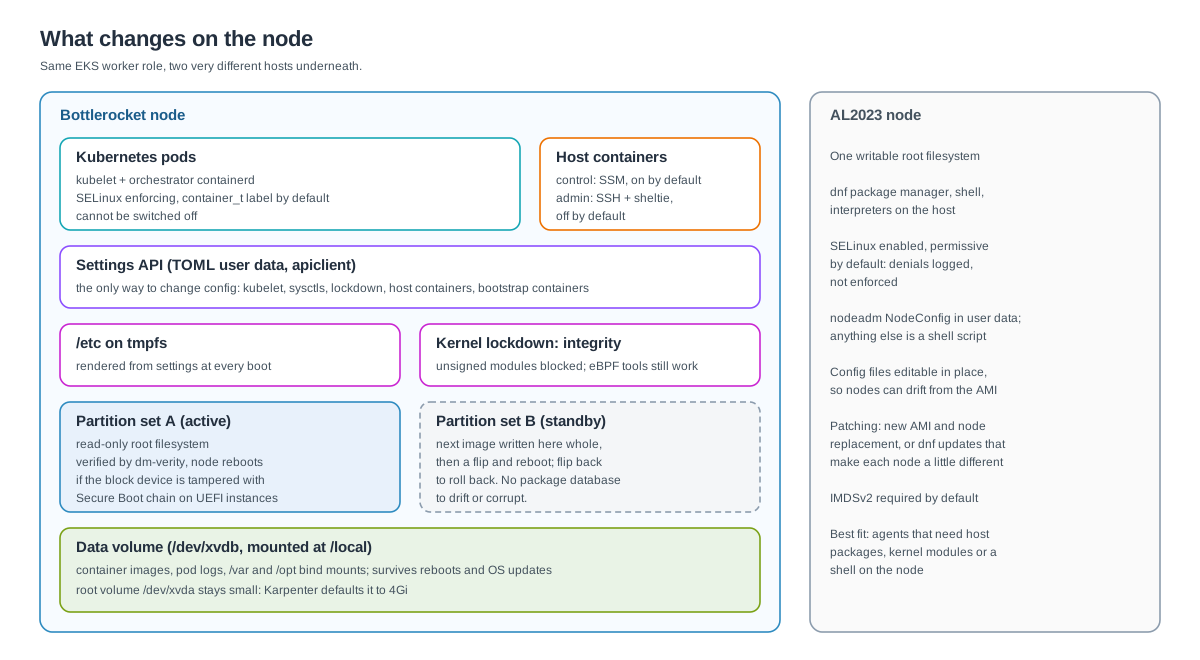
AL2023 and Bottlerocket side by side
| Area | AL2023 (EKS-optimized) | Bottlerocket |
|---|---|---|
| Root filesystem | Writable | Read-only, checked by dm-verity; the node reboots if the device is tampered with |
| SELinux | Enabled, permissive by default: denials are logged, not enforced | Enforcing, and cannot be disabled |
| Shell and packages | bash, dnf, interpreters | No shell or interpreters in the OS; no package manager |
| Configuration | nodeadm NodeConfig plus any script you add; files editable in place | TOML settings through an API; /etc is tmpfs, rebuilt from settings on every boot |
| Kernel | Modules load freely | Lockdown in integrity mode on most variants: unsigned modules blocked |
| Updates | New AMI and node replacement, or dnf on running nodes | Whole-image update to a standby partition, flip, reboot, roll back if needed |
| Node access | SSM or SSH straight to a host shell | SSM to a control container; admin container and root shell are off until enabled |
| Compliance | Hardening is yours to script | CIS Benchmark for Bottlerocket; FIPS 140-3 variants since 1.27.0 |
Why should you move from AL2023 to Bottlerocket?
Because most of what AL2023 adds on a worker node is attack surface and drift risk. A container escape on Bottlerocket lands on a read-only, verified root with SELinux enforcing and no shell to pivot from. Patching becomes swapping one image for another, so every node on a version is byte-for-byte the same.
That breaks down into five concrete gains.
1. An escape lands somewhere with nothing to use
Most container breakouts need the host to cooperate: a writable binary to replace, a shell to run, a package manager to pull tools with. Bottlerocket's root filesystem is read-only and backed by dm-verity, so a process cannot overwrite system binaries, and the kernel restarts the node if the underlying block device is altered. That design is specifically aimed at escapes like the 2019 runc vulnerability (CVE-2019-5736), which overwrote the host runc binary. There is no shell or Python on the host to script the next step, and SELinux enforcing applies its policy even to processes running as root with every capability.
On AL2023 you can get part of the way there by switching SELinux to enforcing yourself and stripping packages. Bottlerocket starts there and offers no switch to turn it off.
2. Nodes cannot drift
On a general-purpose host, someone eventually edits a file during an incident. /etc/containerd/config.toml gains a mirror, a sysctl gets bumped, and the node now differs from its AMI in a way nobody wrote down. On Bottlerocket, /etc lives in memory and is rendered from API settings at every boot. A manual edit does not survive a reboot, and the only durable change is a setting you can see in user data. For a fleet that Karpenter replaces constantly, that is the property you want: the node is its settings, nothing more.
3. Patching is an image swap, not a package transaction
Bottlerocket keeps two partition sets. An update writes the new OS image to the inactive set, flips, and reboots. If the new image misbehaves, it flips back. There is no package database to corrupt and no half-applied transaction. With Karpenter you rarely run that in-place path at all: a new Bottlerocket release changes the AMI, Karpenter marks nodes as drifted, and replaces them under your disruption budgets. Bottlerocket's own security guidance recommends designing for periodic host replacement even when in-place updates are on, which is exactly how a Karpenter fleet already behaves. If you do want in-place updates, the Bottlerocket update operator handles them inside the cluster.
4. Kernel and boot chain locked down by default
Kernel lockdown runs in integrity mode on most variants, which blocks writes to kernel memory and loading unsigned modules, even by root. On UEFI instance types Secure Boot extends the chain of trust from firmware through the bootloader and kernel to the verified root filesystem. Integrity mode leaves eBPF-based observability and security tools working. The stricter confidentiality mode would break them, which is why it is not the default.
5. Compliance starts closer to the finish line
There is a CIS Benchmark written specifically for Bottlerocket. AWS reports that the EKS-optimized Bottlerocket AMI meets 18 of the 28 Level 1 and Level 2 recommendations without extra configuration. The remaining ten are covered by a bootstrap container and kernel sysctls in user data. For FIPS work, Bottlerocket has shipped FIPS variants since 1.27.0 that use FIPS 140-3 validated cryptographic modules. On AL2023 every one of those controls is a script you own, test and keep current.
When should you stay on AL2023?
Stay when something on the node needs to behave like a normal Linux host. That means agents that install packages or kernel modules on the host, DaemonSets that write into system paths, tooling that assumes SSH and a shell, or a custom AMI pipeline you are not ready to rebuild. Bottlerocket blocks all of these by design.
- Kernel modules. Anything that compiles or loads an out-of-tree module at runtime is blocked by lockdown integrity mode. Check older security agents and storage drivers first.
- Host writes. A privileged DaemonSet that edits
/etcor drops binaries into/usrwill fail: the root is read-only and/etcis rebuilt at boot. Writable host paths live on the data volume under/varand/opt. - Host logs. Pod logs stay under
/var/log/containers, so log shippers that tail them keep working. Host-level logs come from the journal and fromlogdog, not from a/var/log/messagesfile. - SELinux labels. Pods run as
container_t. A pod that reaches into host files may need a different label in itsseLinuxOptions, and Bottlerocket's guidance is to grant that sparingly. - Custom bootstrap. A long AL2023 user-data script has to become TOML settings, plus a bootstrap container for anything settings cannot express.
None of these is a reason to keep a whole cluster on AL2023. Keep a small AL2023 NodePool for the exceptions, tainted so only those workloads land there, and move everything else.
How do you run Bottlerocket nodes with Karpenter?
Point an EC2NodeClass at the Bottlerocket alias and Karpenter does most of the rest. It picks the EKS-optimized AMI for your Kubernetes version, generates the TOML user data for cluster join, and sets up the two EBS volumes. Your own user data merges in for kernel, kubelet and host-container settings.
A few things in there are easy to get wrong:
- Size the data volume, not the root. Images and logs live on
/dev/xvdb. Karpenter's default is 20Gi, which a node full of large images fills quickly. The root volume only holds the OS partitions, and Karpenter's 4Gi default is fine. - Let
@latestdo the patching, and pace it. Withbottlerocket@latest, each new Bottlerocket release changes the AMI Karpenter resolves, so every node in the pool is marked as drifted and replaced. That is the patch process, with nothing to bump by hand. The NodePool's disruption budget sets how fast the roll goes, so give it a budget such asnodes: "10%"and a schedule window if you want replacements kept to working hours. - Leave the join settings alone. Karpenter owns the cluster name, endpoint, certificate, labels, taints and anything under
spec.kubelet, and its values win over the same keys in your user data. Unknown TOML keys are ignored rather than rejected, so a typo fails silently. - Do not configure ephemeral storage yourself. On Bottlerocket 1.22.0 and later, Karpenter sets up instance-store disks through the generated settings.
For comparison, the AL2023 version of the same node class carries a nodeadm NodeConfig in MIME user data, and any hardening beyond that is a shell script you maintain. The Bottlerocket version has nothing to maintain beyond the settings you can read above.
Debugging a node with no shell
This is the change teams feel first. Nothing on a Bottlerocket node accepts SSH by default. The control container is on, though, and it runs the SSM agent, so Session Manager is still the front door. From there, the admin container is a deliberate break-glass step:
Most of the time you will not need any of that. kubectl debug node/<name> gives you a pod on the node with the host filesystem mounted, and apiclient get settings from the control container shows exactly how the node is configured. If shelling onto nodes is still a daily habit, treat that as the real signal: the metrics and logs you rely on are not on the cluster yet.
A migration path that does not need a maintenance window
- Inventory the DaemonSets. List every DaemonSet with
privileged: true, ahostPathvolume or host namespaces. Those are the workloads that might care which OS is underneath. Check each vendor's Bottlerocket documentation; most major agents publish settings for it. - Translate the user data. Turn every line of the AL2023 bootstrap into a Bottlerocket setting. Whatever has no setting becomes a bootstrap container, or a reason to keep that workload on AL2023.
- Add a Bottlerocket NodePool beside the existing one. Give it a taint and move one stateless service onto it with a matching toleration. Watch it through a few deploys and at least one node replacement.
- Switch the default NodePool. Point its
nodeClassRefat the Bottlerocket EC2NodeClass. Karpenter marks every existing node as drifted and replaces them, honouring PodDisruptionBudgets and the NodePool's disruption budget, so the roll happens at the pace you set. - Keep a small AL2023 pool for the exceptions, tainted, and treat everything that lands there as a list of things to fix.
The drift-based roll is only as gentle as your workloads. Services with sensible PodDisruptionBudgets, grace periods and more than one replica per zone move without anyone noticing. Those are the same fixes that make a cluster safe to run on Spot.
Is Bottlerocket worth the migration effort?
For clusters that only run containers, yes. The work is mostly one-time: auditing privileged DaemonSets, translating user data to settings and changing how people debug nodes. What you get back is permanent, a smaller attack surface, no configuration drift and patching that is a node replacement Karpenter already knows how to do.
The exceptions are real but narrow. Plan for them with a small AL2023 pool rather than letting them hold the whole fleet on a general-purpose OS.
About Hardik Shah
Hardik has run EKS fleets on both AL2023 and Bottlerocket nodes. He treats the node OS as a security boundary first and a convenience second.