Running EKS on 100% Spot with Karpenter: What Actually Has to Change

Hardik Shah
Cloud Architect & AWS Expert
Moving an EKS cluster's application workloads entirely onto Spot is mostly not a Karpenter problem. The Karpenter side is a NodePool, a feature gate and an SQS queue. The real work is getting every service to lose a node with two minutes' notice and not show it in the error rate.
This post walks through both halves: the NodePool and interruption settings that keep Spot churn small, and the application changes that make it survivable, with most of the space given to the parts teams usually get wrong. None of it depends on a service mesh, so it applies whether or not you run one.
Decide what never runs on Spot
"100% Spot" never means the whole cluster. Start by asking what breaks when a node disappears, not which service feels important. The answer is usually short. Two things belong on it in every cluster I have built.
- Karpenter itself. Run the controller on a small managed node group or on Fargate, never on capacity Karpenter provisions and never on Spot. If the controller's own node is reclaimed during an interruption wave, the thing that replaces nodes is the thing that just went away.
- The cluster's front door and its healers. Ingress controllers, CoreDNS and the controllers that keep the cluster running sit on a small on-demand system pool, tainted so application pods stay off it. Losing a replica of a stateless API is a blip. Losing the ingress tier during a reclaim is an outage.
Everything else, the application Deployments and the batch Jobs, goes to one application NodePool that prefers Spot.
The application NodePool
This is the shape of the NodePool, on the Karpenter v1 API. Note what it does not list: individual instance types.
Why diversify instead of pinning instance types?
Every instance type in every Availability Zone is its own Spot capacity pool, with its own price and its own interruption rate. Pin two types across three zones and the fleet draws from six pools, so one tight pool reclaims a large share of it at once. Broad requirements spread the fleet across over a hundred pools instead.
On-demand, pinning m6i.2xlarge and m6i.4xlarge because you benchmarked them is reasonable. On Spot it is the most common way to get hurt, because the replacement capacity has to come from the same few pools that just ran short. Specifying categories, generations and sizes lets Karpenter pick. When it launches Spot it uses EC2 Fleet with the price-capacity-optimized allocation strategy, which favours pools that are both cheap and deep rather than simply the cheapest. The cheapest pools are often the next ones to be reclaimed.
The other settings in that NodePool each earn their place:
instance-generation Gt 5keeps out older generations, which usually cost more per unit of performance.- Sizes from xlarge to 8xlarge. Small nodes lose a large fraction of themselves to DaemonSets and system reservations. Very large nodes mean one reclaim evicts a big slice of the fleet. The 8xlarge cap bounds the blast radius of a single interruption.
budgets: nodes: "10%"caps how many nodes Karpenter disrupts voluntarily at the same time. AWS does not ask permission before a Spot reclaim, so the budget does not cover that, but it stops consolidation from adding its own churn on top of an interruption wave.expireAfter: 336hrecycles every node within two weeks, which keeps AMIs current. Most Spot nodes never live that long anyway.
Mixing families in one NodePool only works if pods carry honest resource requests. Karpenter sizes nodes from requests, not usage. A service that requests 100m of CPU and burns two cores will behave very differently on a compute-optimised node than on a memory-optimised one. Fix requests before turning any of this on.
Turn on Spot-to-Spot consolidation
By default, consolidation can delete Spot nodes and can replace on-demand nodes with cheaper Spot ones. It will not replace a Spot node with a cheaper Spot node. That sits behind the SpotToSpotConsolidation feature gate, set through the Helm chart values:
Without it, a Spot fleet slowly drifts more expensive. Prices move, and the instance Karpenter chose last week is no longer the best deal today. With it on, consolidation keeps re-picking. Karpenter also protects you from the obvious failure here. Always moving to the cheapest pool would chase the most interrupted capacity and churn the cluster for pennies, so a single-node Spot replacement needs at least 15 candidate instance types. That is one more reason a broad NodePool beats a pinned one.
Let on-demand fill the gaps
Spot capacity for a given shape can dry up in a zone, and it tends to happen during a traffic peak, when every other account wants the same instances. A Spot-only NodePool with hard zone spread would leave pods Pending in that zone until capacity came back.
That is why the NodePool above allows both spot and on-demand. When both are allowed, Karpenter always tries Spot first and launches on-demand only for a pending pod it cannot place on Spot. Once Spot capacity returns, consolidation replaces those on-demand nodes, so the fallback cleans up after itself. Day to day the pool runs entirely on Spot. On-demand appears for the stretches when Spot genuinely is not there.
What happens when AWS reclaims a Spot node?
AWS sends a two-minute warning through EventBridge. With an interruption queue configured, Karpenter reads it within seconds, taints the node, drains it through the Eviction API and provisions replacement capacity in the same zone. At the two-minute mark the instance is terminated, whether or not the drain has finished.
Karpenter only hears about interruptions if you tell it where to listen. EC2 publishes Spot interruption warnings, rebalance recommendations, scheduled maintenance and instance state changes to EventBridge. Rules route those events to an SQS queue, and Karpenter reads the queue:
This is the setting to check twice, because nothing complains when it is missing. Without interruptionQueue, Karpenter learns a node is gone only when it vanishes, and every pod on it dies without a graceful shutdown. The Karpenter submodule of the Terraform EKS module and the getting-started CloudFormation template both create the queue and the rules. If you build them yourself, cover all four event types: Spot interruption warnings, rebalance recommendations, instance state-change notifications and scheduled health events.
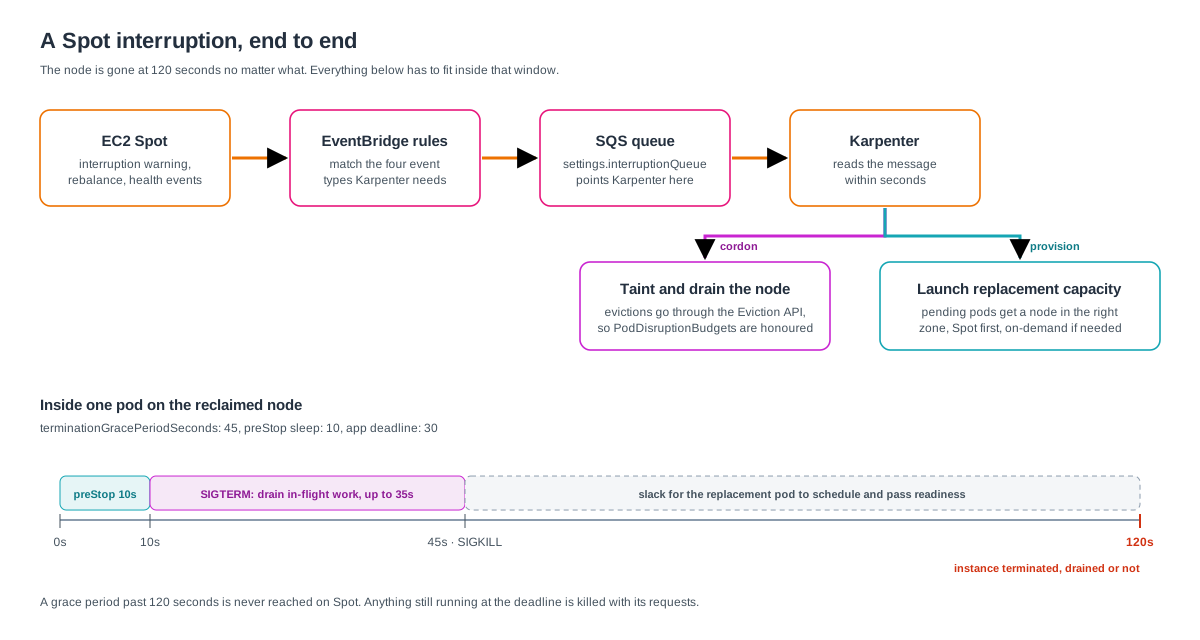
With the queue in place, an interruption runs like this:
- AWS sends the two-minute warning, and Karpenter picks it up from SQS within seconds.
- Karpenter taints the node so nothing new lands there, then evicts its pods through the Eviction API, which respects PodDisruptionBudgets.
- Evicted pods go Pending, and Karpenter launches replacement capacity in the right zone for anything that does not fit on existing nodes.
- At the two-minute mark the instance is terminated, drained or not.
The last step is the one that shapes everything else. PodDisruptionBudgets slow a drain down. They cannot stop AWS. Any workload that needs more than about two minutes to move is killed, so the application side of full Spot comes down to fitting inside that window.
Make each service survive losing a node
This is where the effort goes. The Karpenter configuration is a few hundred lines of YAML. Making dozens of services indifferent to a disappearing node means touching most of them.
Never more than one replica per node
Most teams already spread Deployments across zones. On Spot, add a second constraint that spreads by hostname:
The hostname spread is the one that matters. Consolidation is very good at bin-packing, and left alone it will put three of a service's four replicas on one large node. One reclaim then takes out three replicas, and the survivor carries all the traffic until the others come back. Spreading by hostname limits each interruption to one replica per service. It is ScheduleAnyway on purpose: a hard rule would force a new node for every replica beyond the node count and defeat consolidation entirely.
Three replicas and a PodDisruptionBudget
Every service should run at least three replicas, one per zone, with a PodDisruptionBudget:
Use maxUnavailable: 1 rather than a fixed minAvailable, so the budget keeps working as the HorizontalPodAutoscaler changes the replica count. At three replicas or thirty, a drain moves one pod at a time. A PDB cannot save a pod on a node that is being reclaimed. What it does is stop one drain evicting several replicas of the same service when a reclaim hits a few nodes together, and it governs every voluntary disruption Karpenter makes. Never set it to block all evictions. On Spot that protects nothing: the pod is simply killed at two minutes instead of shutting down cleanly.
A shutdown that fits the window
When a pod is deleted, two things start at once. The kubelet runs the preStop hook and then sends SIGTERM. In parallel, the control plane removes the pod from the Service endpoints, and that change has to reach kube-proxy, the ingress controller and the load balancer targets. If the app stops listening before that has propagated, requests keep arriving at a pod that is no longer there. A short preStop sleep keeps it serving while the rest of the cluster catches up:
The native sleep action means the image does not need a sleep binary, which matters for distroless images. On older clusters, an exec hook running sleep 10 does the same thing if the image has a shell. Ten seconds for propagation and up to 35 for the app to finish in-flight work leaves over a minute of the two-minute window for the replacement pod to start somewhere else. Start the audit with any service carrying a five-minute grace period from an old template. On Spot, anything past two minutes is never reached.
The process has to handle SIGTERM
A grace period only helps if the process uses it. After preStop returns, the kubelet sends SIGTERM to PID 1 in each container, and the grace period has been running since the pod was deleted. When it runs out, whatever is left gets SIGKILL along with every request it was serving. A proper shutdown does four things in order:
- Stop accepting new work: close the listening socket, stop polling the queue.
- Finish what is in flight: let open requests complete and finish the current message.
- Release what it holds: close keep-alive connections, flush logs and metrics, close database pools, ack or nack messages.
- Exit by a deadline that is shorter than the grace period minus the preStop sleep, or Kubernetes picks the moment for you.
Runtimes differ in what SIGTERM means, and several treat it as "stop now" rather than "finish up":
- Nginx treats SIGTERM as a fast shutdown. The graceful signal is SIGQUIT. The official image sets
STOPSIGNAL SIGQUIT; custom images built from a distro base often do not.worker_shutdown_timeoutsets the deadline. - Apache httpd treats SIGTERM as an immediate stop that aborts requests. The graceful signal is SIGWINCH, so set
STOPSIGNAL SIGWINCHand cap the wait withGracefulShutdownTimeout. - Go:
http.Server.Shutdown(ctx)does the first three steps properly, but only if you call it. Catch the signal withsignal.NotifyContextand pass a context with a timeout. - Spring Boot: set
server.shutdown=gracefulandspring.lifecycle.timeout-per-shutdown-phase=30s. - Gunicorn handles SIGTERM gracefully out of the box, bounded by
--graceful-timeout, which defaults to 30 seconds. - Queue consumers should stop fetching first, then finish or hand back the message they hold. Ack only after the work is done, so a consumer killed mid-message leaves it to be redelivered rather than lost.
Make sure the signal arrives
Good shutdown code still drops requests if SIGTERM never reaches it. The kubelet signals PID 1, and PID 1 is often not your application.
- Shell-form entrypoints.
CMD node server.jsruns under/bin/sh -c, and the shell does not forward SIGTERM. Use the exec form,CMD ["node", "server.js"], orexecat the end of an entrypoint script. - Package-manager wrappers.
npm startsits between the kubelet and Node and does not reliably pass signals on. Runnodedirectly. - No init process. The kernel ignores a signal sent to PID 1 when the process has no handler for it, so an app running as PID 1 without a SIGTERM handler waits for SIGKILL. A minimal init such as
tiniordumb-initforwards signals, so the worst case becomes an immediate exit instead of a hang.
Testing this takes minutes. Run the container locally under load and docker stop it. If it takes the full ten seconds every time, the process is ignoring SIGTERM and being killed. In the cluster, kubectl delete pod under load runs the same test with the real preStop hook and grace period.
Startup time is now a cost lever
On on-demand capacity, a service that takes 90 seconds to become ready is an annoyance. On Spot it runs one replica short for 90 seconds after every interruption, several times a day. Put it on the review checklist: readiness probes that reflect real readiness, no long warm-up sleeps, and JVM services with startup tuned down.
Jobs need the opposite treatment
A service with three replicas loses one and carries on. A Job forty minutes into a one-hour run loses everything when its node goes. Most churn on a Karpenter cluster is not Spot reclaims, though. It is Karpenter repacking nodes, expiring them and rolling them onto new AMIs. All of that is voluntary, and a pod can opt out:
Put that annotation on every Job's pod template. Karpenter will not voluntarily disrupt a node while such a pod runs, and once the Job finishes the node becomes a normal consolidation candidate again. Releases before v0.32 called it karpenter.sh/do-not-evict. The annotation cannot stop AWS reclaiming the instance, so the other half is making Jobs safe to rerun: idempotent writes, a sensible backoffLimit, and long runs split into shorter steps. A reclaimed Job then costs a retry and nothing worse.
Keep state out of the Spot pool
Full Spot is far simpler when databases, caches and queues live outside the cluster, on managed services. A stateless pod moves anywhere in seconds. A pod with a zonal EBS volume can only move to a node in the same Availability Zone, and a replica that has to resync before it is useful will not fit in two minutes.
What to watch
On Spot, interruptions are routine, so the question changes from "did a node die?" to "did anyone notice?" Three signals answer it:
- Interruption rate from Karpenter's metrics, per instance type and zone. A pool reclaimed far more often than the rest is a reason to widen the NodePool or exclude that type.
- On-demand share of the apps-spot pool, which should sit at zero. A sustained non-zero value means the fallback keeps firing, and you want to know why.
- Error rate and p99 latency at the ingress, lined up against interruption events. This is the real test. If a reclaim shows up in user-facing metrics, some service's shutdown is wrong, and the overlay tells you which one.
How much does running EKS on Spot save?
It depends on how much of the fleet is application workload, because only that part moves. AWS prices Spot at up to 90% below on-demand, but the fleet-level saving lands lower: the system pool stays on-demand, and price-capacity-optimized allocation trades the deepest discount for pools less likely to be reclaimed.
Measure the saving from your own Cost Explorer data before and after, split by the apps-spot pool and the system pool. Reliability matters more than the saving, though, because a reliability regression is what forces a rollback. A side effect worth expecting: the cluster gets sturdier on any capacity type. A node failure, a zone wobble or an aggressive consolidation now hits services that have already rehearsed losing a node many times over.
Before you start
- Choose what stays on-demand by what breaks when a node disappears. The list should be short.
- Never run Karpenter on capacity it manages, and never on Spot.
- Set
interruptionQueue. Without it every reclaim is a surprise, and nothing warns you it is missing. - Constrain NodePools by category, generation and size, not by instance type.
- Spread every service across nodes, not just zones.
- Do the application work first. The Karpenter side takes a day. Grace periods, PDBs, preStop hooks and startup times are where full Spot succeeds or fails, and they improve the cluster on any capacity type.
About Hardik Shah
Hardik builds EKS platforms where Karpenter decides the node shapes and the finance team decides the capacity type. Getting services to shrug off a Spot reclaim is the part of that work he spends the most review time on.