S3 Cross-Account, Cross-Region Replication for a Disaster Recovery Site

Hardik Shah
Cloud Architect & AWS Expert
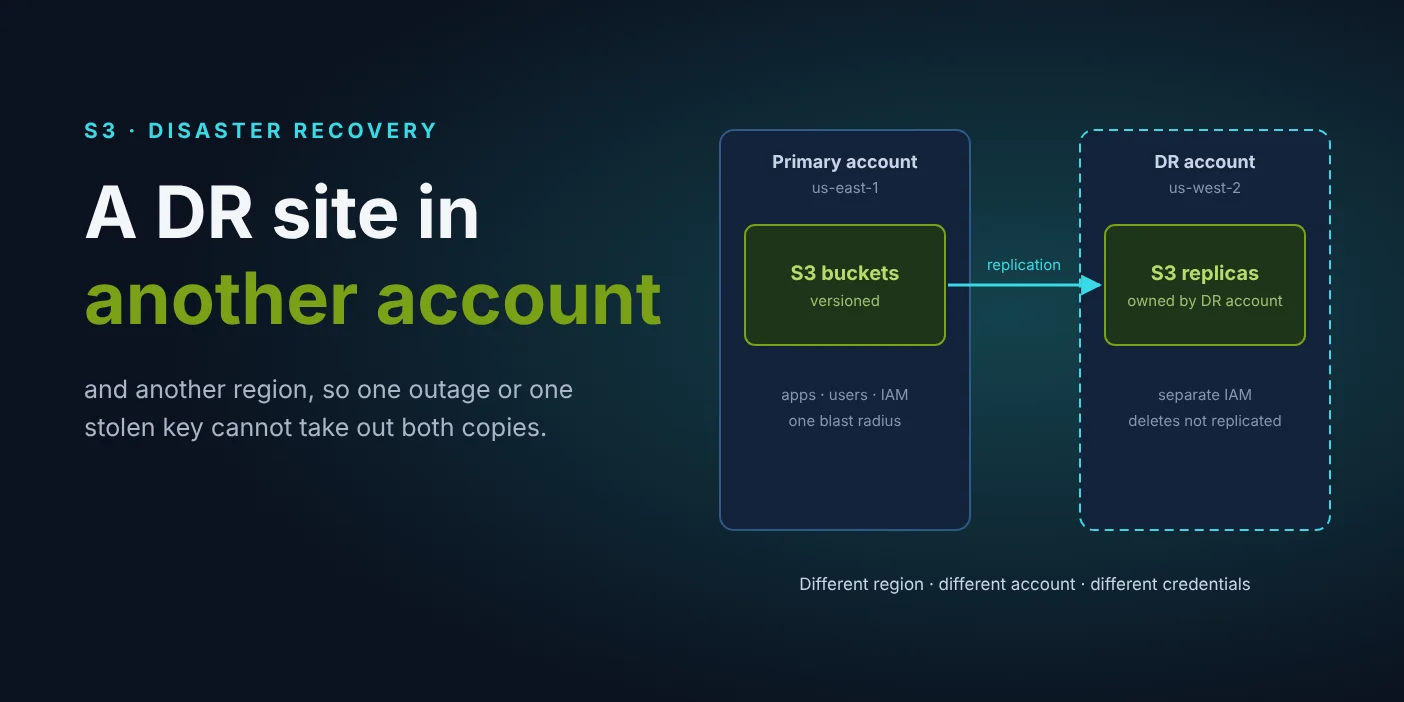
Most S3 backups sit in the same account as the data they protect, and often in the same region. That covers a deleted file. It does not cover a regional outage, a leaked admin key or ransomware that deletes buckets. A disaster-recovery site in a second account and a second region covers all three, and S3 replication keeps it current without a backup job.
What is S3 cross-account, cross-region replication?
It is an S3 replication rule on a source bucket that copies every new object version to a bucket owned by a different AWS account in a different region. S3 does the copying itself, usually within minutes, using an IAM role you give it. The destination account owns the copies and controls who can touch them.
In this post the primary site is account 111111111111 in us-east-1, and the DR site is account 222222222222 in us-west-2. On a recent project we set this up for 16 production buckets, and the reasons below are the ones that got it approved.
Why put the DR copy in a second account and a second region?
Because each one protects against a different failure. A second region survives an outage or a regional event that takes the primary down. A second account survives the failures that start with credentials: a leaked key, a careless admin, ransomware. Replication to the same account in another region only gives you the first.
Here are the advantages in detail.
1. The data survives a regional outage
AWS regions are isolated from each other by design, so an event that takes out S3 or the network in us-east-1 leaves us-west-2 running. With replicas already there, recovery means pointing applications at a different bucket name, not restoring terabytes from somewhere else while customers wait.
2. A compromised primary account cannot reach the copies
This is the advantage that matters most, and a same-account setup cannot give it. If an attacker gets admin credentials in the primary account, they can delete buckets, versions and backups in that account. They cannot touch a bucket in the DR account, because IAM permissions stop at the account boundary. The replication role can write replicas there, and nothing else.
Keep the DR account small: no workloads, a handful of people with access, and its own sign-in path. The fewer things that can authenticate to it, the better it holds when the primary account does not.
3. Deletes in the primary do not delete the DR copy
S3 replication never copies a permanent delete, one made against a specific version ID. And with delete marker replication turned off, a normal delete in the source does not even hide the object in the destination. An accidental aws s3 rm --recursive or a script with the wrong prefix empties the primary bucket and leaves the DR bucket whole.
For stronger protection, turn on S3 Object Lock with a default retention period on the DR bucket. In compliance mode, nobody can delete a locked version before its retention date, including the DR account's own root user.
4. The DR account owns its copies
By default, a replica belongs to the account that wrote the original. With owner override, the replica belongs to the DR account instead, so its bucket policy, its encryption keys and its access rules decide who can read the data. A security team can audit the DR copy without ever getting access to production.
5. A low recovery point without backup jobs
Replication runs on every write, so the DR copy trails production by minutes, not by the hours between nightly backups. AWS says most objects replicate within 15 minutes. If you need a promise, S3 Replication Time Control replicates 99.99% of objects within 15 minutes under an SLA, and adds CloudWatch metrics for replication latency and pending bytes.
6. A cheaper storage class for the copy
The DR copy is read rarely, so it does not need S3 Standard. The rule can write replicas straight into Standard-IA or Glacier Instant Retrieval, which still serve reads in milliseconds when you fail over. The DR account also gets its own bill, so the cost of resilience is visible as one line instead of hiding inside production spend.
7. Versions, metadata and tags come with it
Replication copies each object version with its metadata, tags and encryption, and marks the copy as a REPLICA. Anything that reads tags, such as lifecycle rules, cost reports or access policies, works the same way in the DR bucket. A plain aws s3 sync copy loses older versions and tags.
8. It answers the audit question
Frameworks such as SOC 2 and ISO 27001 ask where the backups live and who can delete them. "In a separate account, in another region, owned by a different team, with deletes not replicated" is a short answer, and the replication configuration itself is the evidence.
Same account or separate account?
A separate account. Versioning and same-account replication both recover from accidents, and cross-region replication adds survival of a regional outage. Only a separate DR account also survives leaked admin credentials and ransomware, because nobody holding the primary account's keys can delete what lives outside it. The table shows each failure.
| Failure | Same-region versioning | Cross-region, same account | Cross-region, separate DR account |
|---|---|---|---|
| Accidental overwrite or delete | Recoverable | Recoverable | Recoverable |
| Regional outage | Data unavailable | Recoverable | Recoverable |
| Leaked admin credentials | Data can be destroyed | Data can be destroyed | Recoverable |
| Ransomware deleting buckets | Data can be destroyed | Data can be destroyed | Recoverable |
How the setup works
There are four pieces, and they have to go in this order, because each one depends on the one before:
- An IAM role in the primary account, trusted by
s3.amazonaws.com, that can read source versions and write replicas. - Versioning and a bucket policy on each DR bucket that let that role write replicas. Add the statements to the existing policy; do not replace it.
- Versioning and a replication rule on each primary bucket pointing at the DR bucket and account.
- An S3 Batch Replication job per bucket for the objects that existed before the rule.
The rule is where the DR choices live:
DeleteMarkerReplication set to Disabled keeps deletes out of the DR site. Owner: Destination hands the replicas to the DR account. StorageClass puts them on a cheaper tier. To add Replication Time Control, add ReplicationTime and Metrics blocks to the destination.
With more than a few buckets, script the four steps with every bucket pair in one config file. The scripts should back up each DR bucket policy before changing it, skip buckets that already have a replication rule, and skip SSE-KMS buckets that need key settings first. The full command-by-command walkthrough is in cross-account, cross-region replication for ECR and S3.
Do not forget the data that already exists
A replication rule only copies objects written after it exists. On the day you turn it on, the DR bucket is empty, and it stays missing every older object until you backfill. S3 Batch Replication does that through the same rule, picking objects whose replication status is NONE or FAILED:
Until every job reads Complete, your DR site has a recovery point of "whenever the rule was created", which is not one anybody signed off on.
What does replication not protect you from?
Replication copies bad writes as faithfully as good ones. An application that corrupts or encrypts objects in place sends those new versions to the DR site within minutes. Versioning on both sides is what saves you there, because the older good versions stay. Replication is a DR copy, not a point-in-time backup.
A few other gaps to plan for:
- SSE-KMS objects are skipped silently unless the rule opts in with
SseKmsEncryptedObjectsand names a key in the DR region. - Bucket settings such as lifecycle rules, CORS, event notifications and website configuration are not copied. Define the DR bucket in the same Terraform or CloudFormation as the primary.
- Lifecycle expirations in the source are not mirrored, so give the DR bucket its own lifecycle rules or it will grow forever.
- Applications are not part of S3 replication. The data being in
us-west-2only helps if something there can read it.
What does it cost?
You pay for a second copy of the data at the DR storage class, inter-region data transfer for every replicated gigabyte, and request charges for writing replicas. Batch Replication adds a per-job and per-object fee for the backfill, and Replication Time Control adds a fee per gigabyte. Writing replicas to Standard-IA keeps the storage half down.
The honest comparison is not with zero. It is with the cost of losing the data, or of restoring it during an outage while the business waits.
Test the DR site before you need it
A replication rule that says Enabled proves nothing. Write a test object to a primary bucket and check that it reaches the DR bucket as a replica:
Then compare object counts per bucket pair once the backfill finishes, and run a failover drill at least once a year: point a copy of the application at the DR buckets and confirm it reads what it needs. Watch the replication metrics in CloudWatch between drills, so a rule that started failing gets noticed in a day, not during the next outage.
Wrapping up
A second region protects you from AWS. A second account protects you from yourself and from anyone holding your keys. S3 replication gives you both with one rule per bucket, replicas owned by the DR account, deletes kept out, and a recovery point measured in minutes.
Set it up in order, backfill what already exists, and test it on a schedule. That is the difference between a DR site and a bucket that happens to be in another region.
About Hardik Shah
Hardik has set up S3 disaster-recovery sites in separate AWS accounts and regions for production workloads. He counts a DR copy as real only after a failover drill has read from it.