Email Notifications for GuardDuty Findings: The Why and the How

Hardik Shah
Cloud Architect & AWS Expert
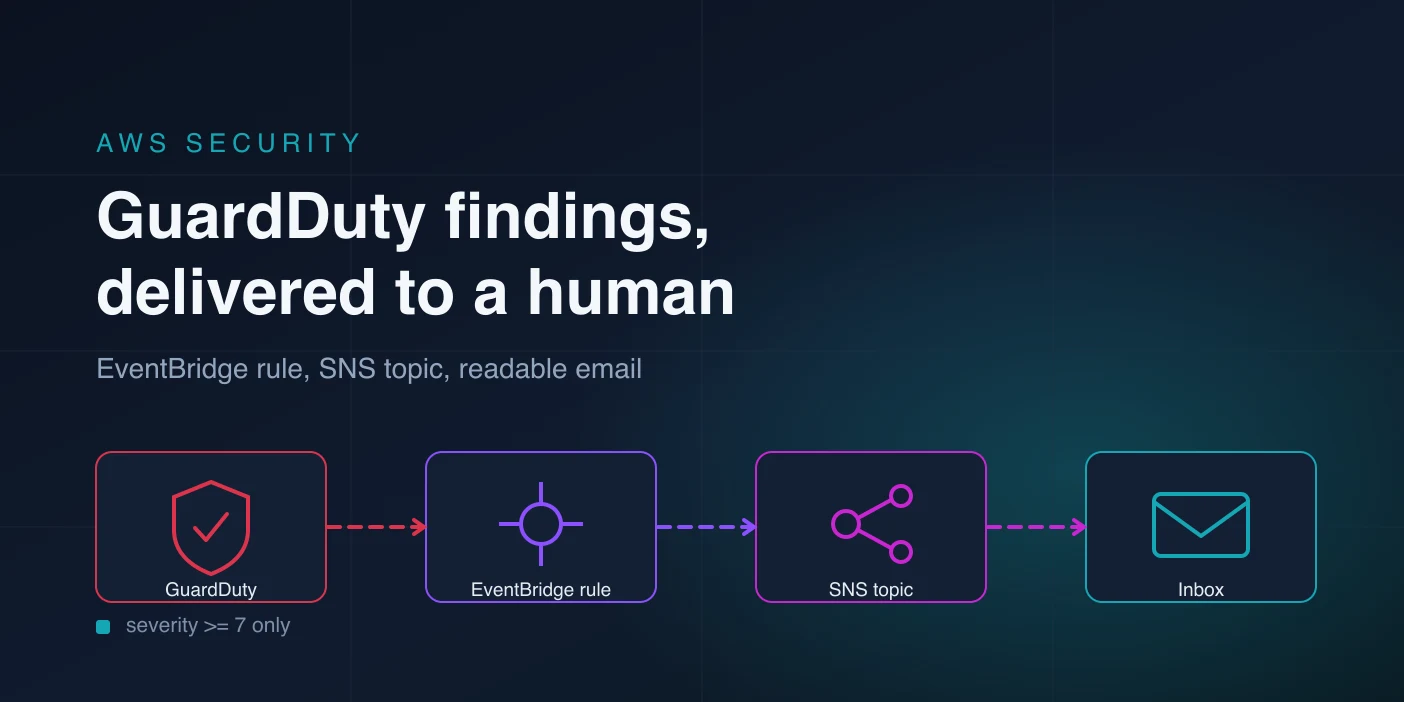
GuardDuty is good at finding things and bad at telling you about them. Enable it and it will happily record that one of your EC2 instances is talking to a known command-and-control host, then leave that fact sitting in a console tab nobody has opened since the last audit. Detection was never the hard part. Delivery is.
Why does GuardDuty not email you when it finds something?
GuardDuty has no notification channel of its own. It writes findings to its console and publishes them to the default EventBridge bus in the same account and region, and that is where its job ends. Nothing routes those events anywhere. Until you build a rule and a target yourself, every finding waits for a human to go looking for it.
Two numbers make that gap worse than it sounds. A brand new finding reaches EventBridge within about five minutes. An update to a finding that already exists follows findingPublishingFrequency, which defaults to six hours. GuardDuty aggregates repeat activity into the existing finding rather than raising a new one, so a compromised instance that keeps beaconing produces one alert at first contact and then goes silent for most of a working day. Set that setting to fifteen minutes on any detector you actually watch.
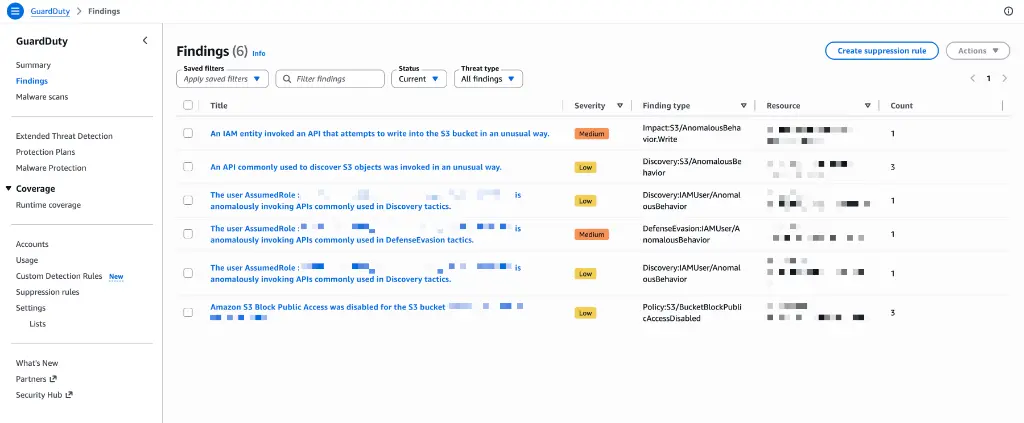
The honest reason to do this work is not that email is a good incident channel. It is that the alternative in most accounts is nothing at all. I have walked into environments with GuardDuty enabled in every region, a tidy compliance checkbox, and a findings list going back eleven months that nobody had read. The detector was doing its job perfectly. The organisation had simply never connected it to a person.
Which GuardDuty findings are worth an email?
Every finding carries a numeric severity from 1.0 to 10.0, bucketed as low, medium, high and critical. Route severity 7.0 and above to email and leave the rest in the console or a dashboard. A mailbox that receives every low-severity port scan gets filtered into a folder within a week, and a filtered folder is not alerting.
- 1.0 to 3.9, low. Reconnaissance that failed, mostly. Port probes, blocked attempts. Worth a weekly glance, not an interruption.
- 4.0 to 6.9, medium. Suspicious but ambiguous. An instance querying a low-reputation domain, unusual API calls from a new location. This is the band where teams argue, and where a dashboard beats a mailbox.
- 7.0 and above, high and critical. Credential exfiltration, crypto mining, traffic to known C2 infrastructure, an IAM user behaving like it has been stolen. These are the ones you want to wake someone up for.
Pick the floor deliberately and write it down somewhere. The number in your event pattern is a security policy decision wearing a JSON costume, and six months from now nobody will remember why it was 7 and not 4.
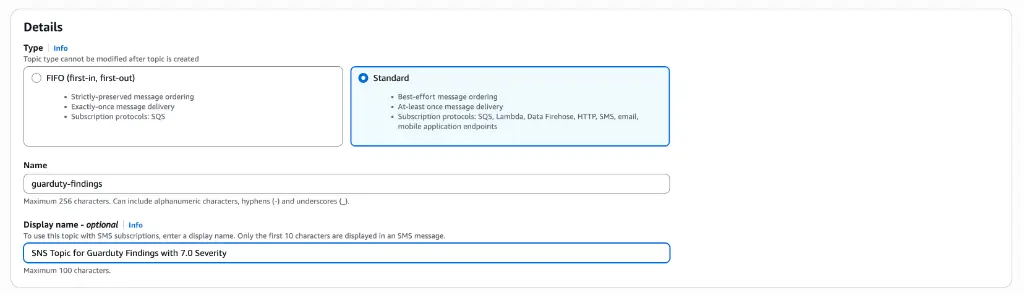
Step 1: Create the SNS Topic and Subscribe
The topic is the fan-out point. One topic, several subscribers later if you want them, and an encryption key so the finding text is not sitting unencrypted in the SNS backend. Use a customer-managed KMS key rather than the AWS-managed one, because the AWS-managed SNS key cannot be granted to another principal and EventBridge will need to use it.
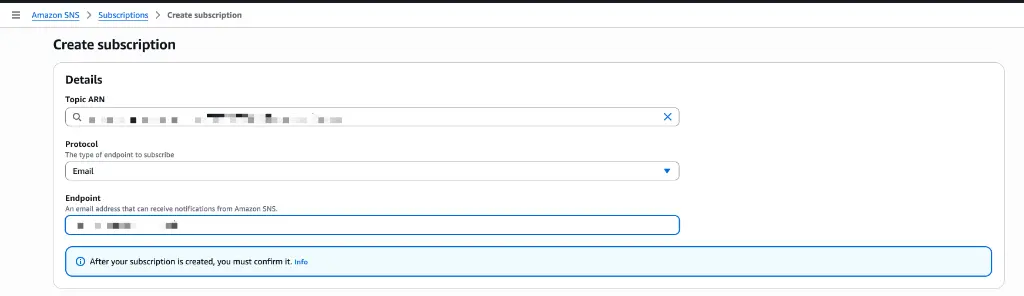
Four resources carry this step. A KMS key with rotation enabled, whose key policy grants the account root full control and lets the events.amazonaws.com service principal call kms:GenerateDataKey* and kms:Decrypt. An SNS topic pointed at that key. A topic policy allowing sns:Publish from the same service principal, scoped to the topic ARN. Then one email subscription per recipient. Miss either policy and EventBridge fails to deliver quietly, because the failure lands in EventBridge's own metrics rather than in your apply output.
That last resource comes with a wrinkle Terraform cannot solve for you. An email subscription is created in PendingConfirmation state and stays there until a human opens the confirmation mail and clicks the link. Terraform reports the resource as created either way, so a green apply is not proof that anyone will receive anything. Subscribe a distribution list rather than a personal address, confirm it once, and check the subscription status in the console afterwards.
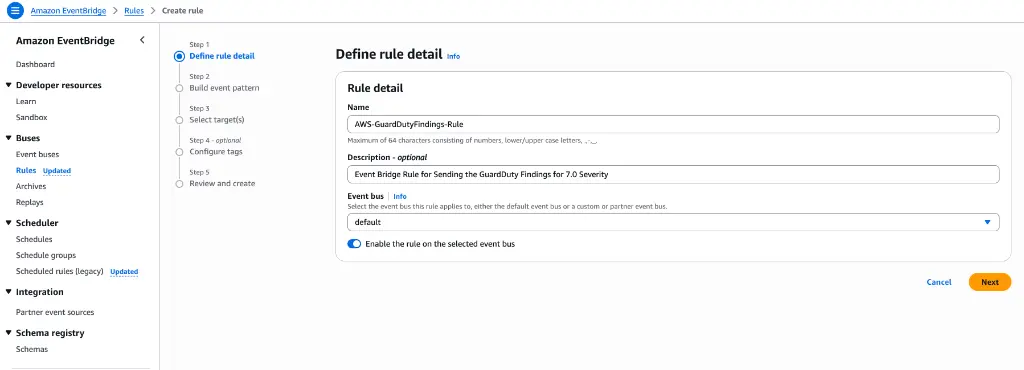
Step 2: Create Eventbrige rule and Filter Findings
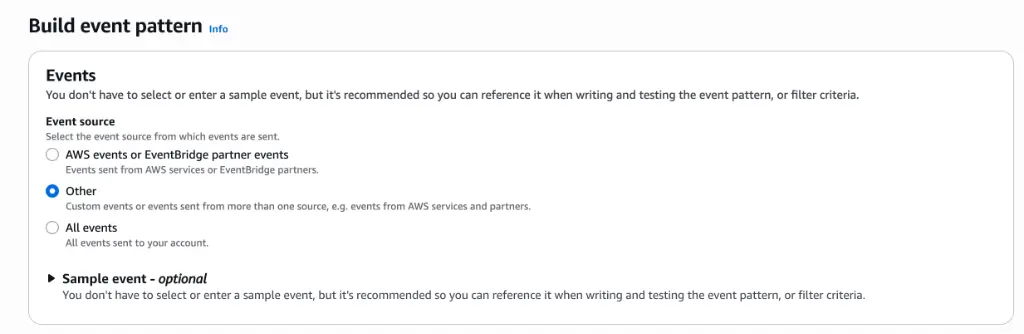
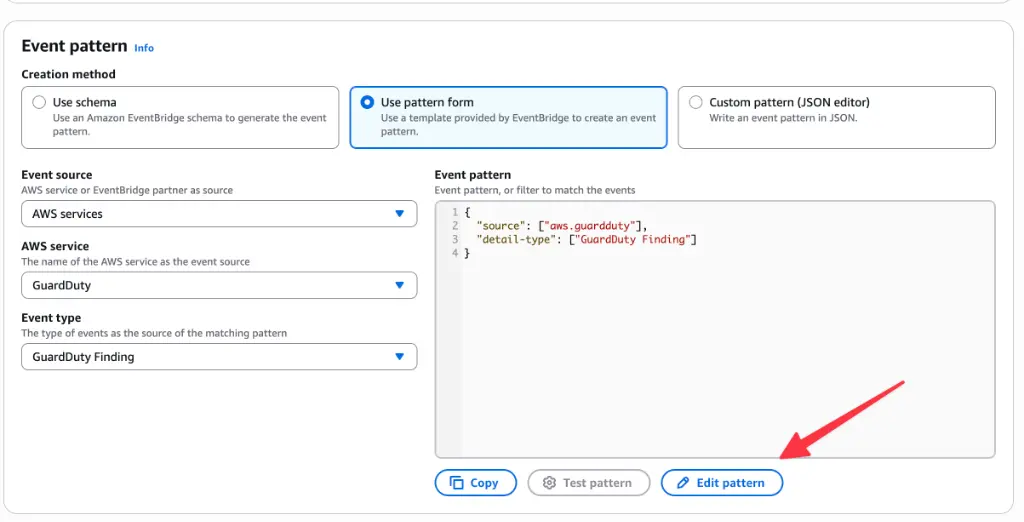
GuardDuty emits every finding onto the default bus with source aws.guardduty and detail type GuardDuty Finding. The severity filter belongs in the event pattern, not in a Lambda downstream. EventBridge matching is free and runs before anything is invoked, so a pattern-level filter costs you nothing and cannot be bypassed by a bug in your own code.
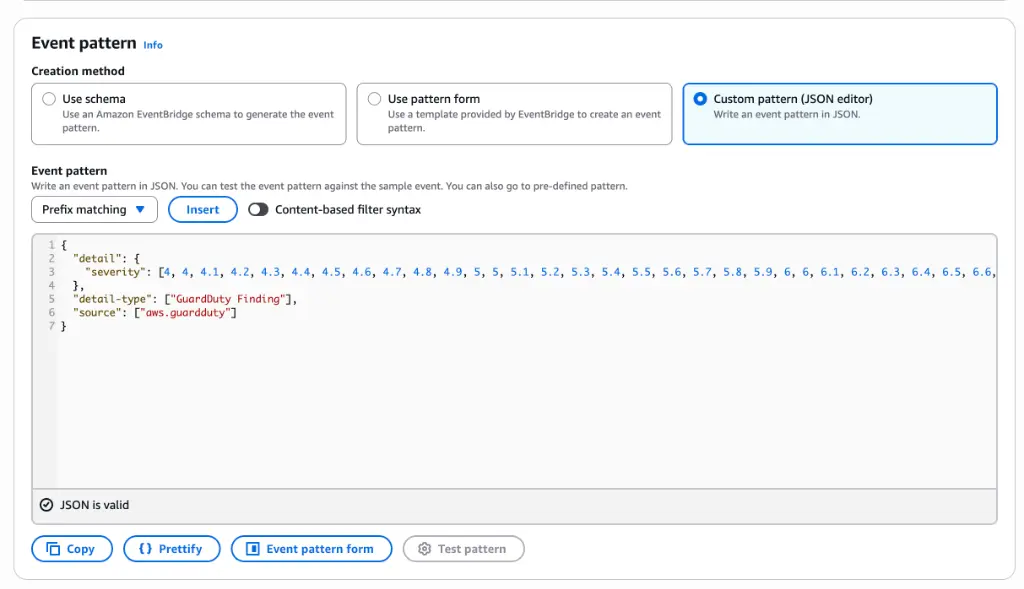
The rule sits on the default bus and needs three keys in its pattern: source aws.guardduty, detail type GuardDuty Finding, and a detail.severity condition of [{ numeric = [">=", 7] }]. No target yet, no IAM role: EventBridge publishes to SNS using the topic policy you wrote in step 1, so there is nothing else to attach here.
The numeric matcher is the part worth remembering. Severity is a float, and a naive pattern listing [7, 8, 9] silently drops a finding with severity 8.5. If you want a second, noisier channel for medium findings, write a second rule with [{ numeric = [">=", 4, "<", 7] }] and point it at a different topic. Two rules with clear thresholds beat one rule plus a filtering Lambda you have to maintain.
Step 3: Send Custom Formatted Email Notifications via SNS
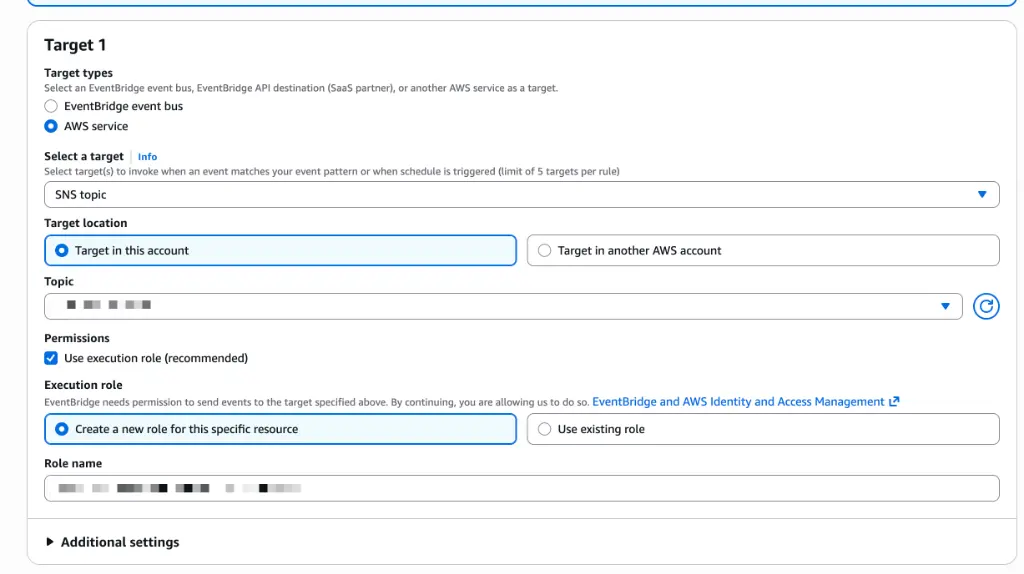
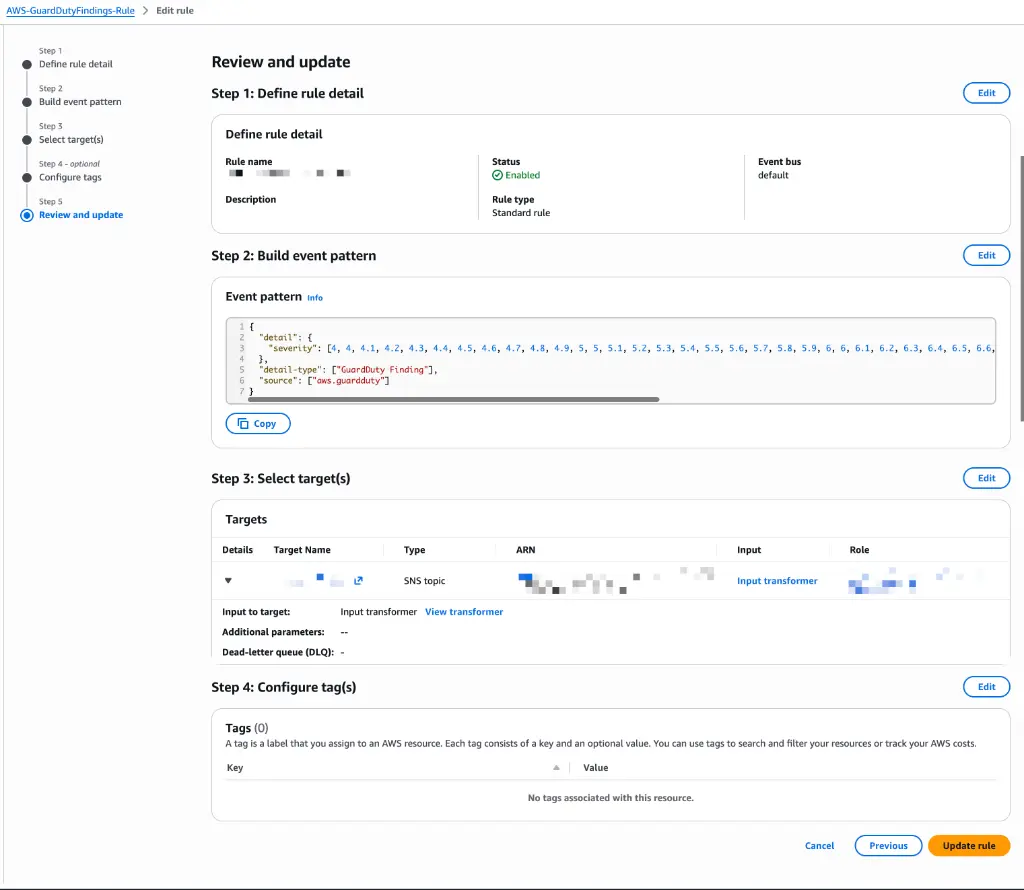
Wire the rule straight to the topic and your team gets the raw finding as its email body: several kilobytes of JSON, most of it network interface metadata, with the one sentence that matters buried in the middle. On a phone at 2am that is useless. EventBridge input transformers fix this without a Lambda, by pulling named paths out of the event and substituting them into a plain-text template.
Attach the topic to the rule as a target and give that target an input transformer. The transformer takes two halves. First a map of names to JSON paths, which is where you pull $.detail.accountId, $.detail.region, $.detail.severity, $.detail.type, $.detail.title, $.detail.description and $.detail.id. Then a template that references those names in angle brackets: a subject line carrying the severity and title, the account and region, the finding type, the description, and a console link built from the region and finding id.

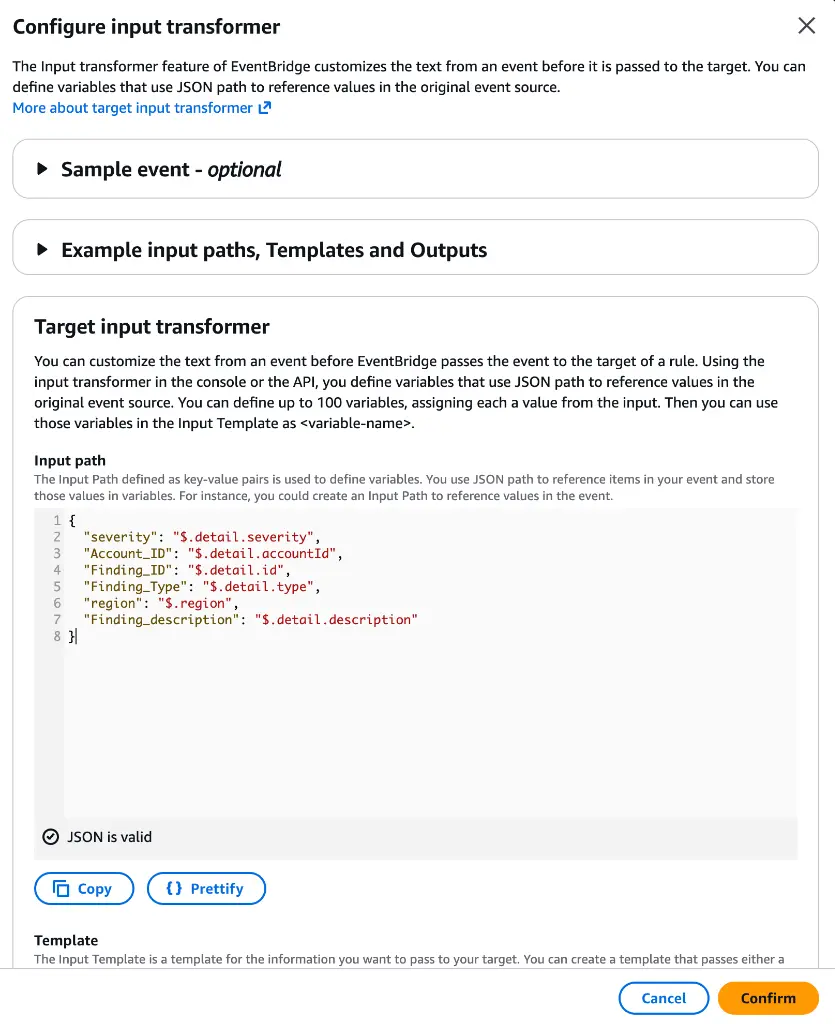
The deep link on the last line is the piece people actually use. It opens the exact finding in the GuardDuty console, so the responder goes from mail app to evidence in one tap instead of hunting through a filtered list. Note that each line of the template needs its own quotes: the transformer produces a JSON string, and unquoted lines produce an invalid template that fails at delivery time rather than at apply time.
Final Summary
Test it before you trust it
Nothing about this pipeline reports failure loudly. An unconfirmed subscription, a KMS policy missing the EventBridge principal, a typo in the event pattern: all three look like silence, and silence looks exactly like a quiet week. Generate a finding on purpose.
If TriggeredRules shows a hit and no mail arrived, the problem is between EventBridge and SNS: topic policy, KMS grant, or an unconfirmed subscription. If it shows nothing, the event pattern never matched. Sample findings carry the severity of the real finding type they imitate, so pick a type that clears your threshold or the test proves nothing. Re-run this after every change to the rule.
More than one account
Build this once, in the delegated administrator account, not once per member account. GuardDuty's organisation setup aggregates member findings into the administrator, and those aggregated findings appear on the administrator's own EventBridge bus, which means one rule and one topic cover the estate. The template already prints the offending account id, so a responder can tell whose instance is mining Monero without opening anything.
The regional part is the trap. EventBridge is regional, GuardDuty runs per region, and a detector enabled in eu-west-1 publishes to eu-west-1's bus. If you enabled GuardDuty everywhere and built the rule in one place, you have alerting for one region and a compliance checkbox for the rest. Loop the rule over your enabled regions with a provider alias per region, and point them all at a topic in your primary region.
What this costs and where it stops
The routing is close to free. EventBridge does not charge for events published by AWS services, and SNS gives you the first thousand email notifications each month at no cost, then charges a couple of dollars per hundred thousand after that. If a high-severity filter is putting you anywhere near a thousand emails a month, your bill is not the problem you should be looking at. GuardDuty itself is the real line item, priced on data volume analysed.
And the limits are worth saying plainly. SNS email is plain text with no formatting, no threading, no deduplication, and no acknowledgement that anyone read it. Two hundred findings from one compromised instance become two hundred emails. There is no on-call rotation, no escalation if the first responder is asleep, and no record of who picked it up. This pipeline is a floor, not an incident response process.
When you outgrow it, the same EventBridge rule is the seam. Swap the SNS target for Security Hub, a PagerDuty event bus, or a Lambda that opens a ticket, and the detection half of the setup does not change. That is the actual argument for putting the severity filter in the event pattern rather than in application code: the routing stays replaceable.
Using this as a Terraform module
Everything above is the wiring I end up writing on most client accounts, so it now lives in a module rather than in a snippet I copy between repositories. It creates the key, the topic, the subscriptions, the rule and the transformer, and it can create the detector too when the account does not have GuardDuty on yet. The source, a usage example and the full input and output tables live in the repository: terraform-aws-guardduty-sns-alerts.
To use it, add a module block in your root configuration and point its source at the repository over the GitHub source address, with a ref query argument pinned to a released tag rather than to the default branch, so a later commit on main cannot change what your next apply builds. Then run terraform init so Terraform fetches that tag into the module cache, and re-run it with -upgrade whenever you move the pin. The module declares no provider of its own, so it inherits the AWS provider and region from the root configuration you call it from.
Two inputs are required. name_prefix is the string every resource name is built from, so give each account or environment its own value and the topic, the key alias and the rule stay distinct when you run the module more than once in a region. email_addresses is a set of strings, one subscription per entry, and every address gets a confirmation mail from AWS that someone has to click before any finding reaches it. Everything else has a default: severity_threshold at 7, finding_publishing_frequency at fifteen minutes, event_bus_name on the default bus, kms_deletion_window_in_days at 30, and tags empty, merged onto every taggable resource the module creates.
After the first apply there are three things left to do by hand. Confirm the subscription from each recipient inbox, because an unconfirmed subscription stays in the pending state and drops findings silently. Run the smoke test above against the rule the module created, using its event_rule_name output as the metric dimension. Then repeat the whole call in every region where GuardDuty is on, since a detector is regional and a rule in one region never sees findings from another.
Three of those defaults are worth a second look. create_detector stays false because AWS allows one detector per account per region and a second one fails the apply, so the module adopts whatever is already there unless you tell it otherwise. severity_threshold feeds the numeric matcher directly, so dropping it to 4 gives you the medium-severity channel discussed above without editing any HCL. Leave kms_key_arn unset and the module creates a customer-managed key with rotation on; pass one and it uses yours, provided that key already lets events.amazonaws.com call kms:GenerateDataKey.
The outputs are the seams. sns_topic_arn lets you attach a second protocol later, an HTTPS endpoint or a Lambda, without touching the rule. event_rule_name is the dimension the TriggeredRules metric query needs, so the smoke test above works against a module output instead of a hardcoded name. Run it once per region that has a detector; deploying to one region and enabling GuardDuty in twelve is the failure mode I see most often.
About Hardik Shah
Hardik sets up GuardDuty on client accounts and then has to answer the obvious follow-up question about who actually sees a finding. The EventBridge and SNS wiring here is the version he keeps reusing.